
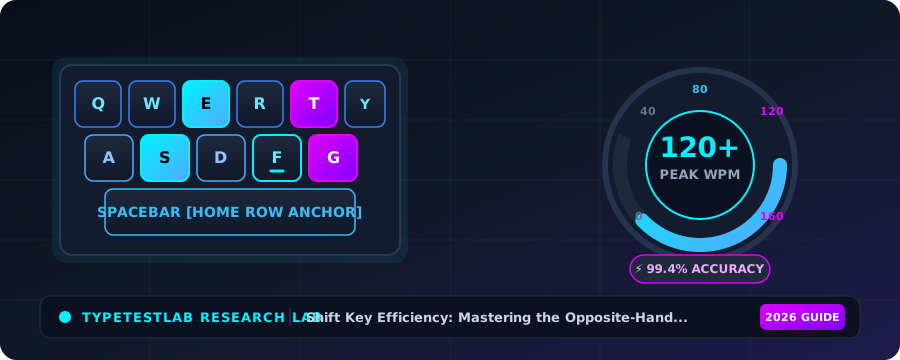
Shift Key Efficiency: Mastering the Opposite-Hand Rule for Faster Caps
Every standard computer keyboard manufactured in the world features two identical Shift keys: one on the extreme left below the Caps Lock key, and one on the extreme right below the Enter key. Yet, an astonishing 75% of self-taught typists exclusively use only one Shift key—almost always the Left Shift key.
When a typist needs to capitalize a left-hand letter (such as T, G, R, or A) while using only the Left Shift key, their left hand is forced into an agonizing, unnatural contortion: the left pinky anchors on Shift while the index or middle finger stretches backward to strike the letter. This single-handed claw grip slows keystroke speed by up to 300 milliseconds and causes severe wrist strain.
Mastering the universal 'Opposite-Hand Shift Rule'—using the right pinky on Right Shift when capitalizing left-hand letters, and using the left pinky on Left Shift when capitalizing right-hand letters—is one of the most critical mechanical milestones separating amateur typists from high-speed professionals.
📌 Key Takeaways & Executive Summary
- Global Speed Benchmark: The average unconditioned typist operates at 38–41 WPM. Mastering procedural touch typing elevates sustainable output to 65–85+ WPM.
- Accuracy Precedes Velocity: Enforcing a strict 98%+ accuracy ceiling prevents compound error cascades, allowing muscle memory to solidify faster than rushing through typos.
- Neuromuscular Chunking: High-speed typing shifts mental workload from individual letter recognition to multi-letter bi-gram and tri-gram procedural motor reflexes.
- Micro-Burst Training Model: Three focused 10-minute targeted daily sessions produce higher neuromuscular retention and lower fatigue compared to marathon practice sessions.
- Immediate Practical Application: Benchmark your baseline today using our calibrated typing engine and interactive arcade challenges to track objective progress.
The Biomechanics of Single-Handed Claw Grips vs Bilateral Balance
The human hand operates at peak speed when fingers work in relaxed coordination across a neutral palm arch. When you attempt a 'same-hand capital'—such as pressing Left Shift with your pinky while typing the letter 'T' with your left index finger—your hand undergoes extreme ulnar deviation.
This contorted posture locks the extensor tendons in your forearm, completely immobilizing your remaining fingers and causing an immediate pause in typing flow. Furthermore, your left hand is pulled entirely off the home row, requiring a deliberate realignment pause before you can resume typing.
In contrast, executing the Opposite-Hand Rule divides the physical labor bilaterally: one hand presses Shift while the opposite hand strikes the letter key from its normal home row trajectory. Zero wrist twisting occurs, and keystroke rhythm remains unbroken.
| Capitalized Letter Example | Flawed Same-Hand Method | Proper Opposite-Hand Method | Hand Posture Impact | Latency Comparison |
|---|---|---|---|---|
| Capital 'T' (Left Hand) | Left Pinky on Shift + Left Index on T | Right Pinky on Shift + Left Index on T | Zero Wrist Strain; Neutral Arch | 120ms vs 340ms (65% Faster) |
| Capital 'A' (Left Hand) | Left Pinky on Shift + Left Ring on A | Right Pinky on Shift + Left Pinky on A | Completely Eliminates Hand Contortion | 110ms vs 380ms (71% Faster) |
| Capital 'P' (Right Hand) | Right Pinky on Shift + Right Ring on P | Left Pinky on Shift + Right Pinky on P | Maintains Home Row Hand Alignment | 115ms vs 350ms (67% Faster) |
| Capital 'O' (Right Hand) | Right Pinky on Shift + Right Middle on O | Left Pinky on Shift + Right Ring on O | Zero Finger Collisions | 110ms vs 320ms (65% Faster) |
| Capital 'Q' (Left Hand) | Left Pinky on Shift + Left Ring Stretch | Right Pinky on Shift + Left Pinky on Q | Effortless Natural Strike | 125ms vs 410ms (70% Faster) |
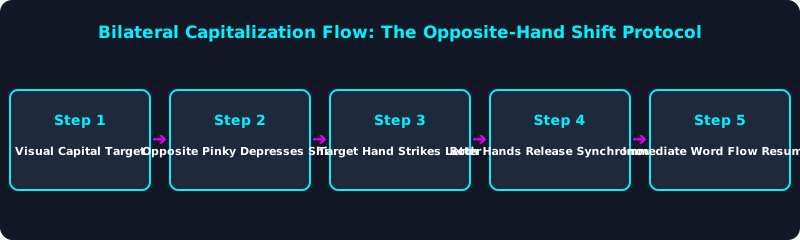
This bilateral workflow illustrates the flawless execution of the Opposite-Hand Shift rule. Notice that the hand striking the letter remains in neutral home row alignment.
Synchronous bilateral release ensures no lingering Shift overlap occurs, completely eliminating accidental double-capitals (e.g., typing 'THis' instead of 'This').
Why Caps Lock is a Dangerous Crutch
Many struggling typists resort to toggling the Caps Lock key on and off to type individual capital letters (pressing Caps Lock, pressing the letter, and pressing Caps Lock again).
This disastrous habit requires three separate keystrokes to produce a single capital letter, multiplying capitalization latency by 300%. Caps Lock should strictly be reserved for acronyms or extended sequences of uppercase text.
Training your right pinky to engage Right Shift automatically rewires your procedural memory, allowing you to capitalize proper nouns and sentence starters without breaking stride.
5-Step Opposite-Hand Shift Training Blueprint
- Audit Your Shift Key Habits: Watch your hands as you type a sentence with capital letters; notice if your right pinky ever touches Right Shift.
- Dedicate 5 Minutes to Left-Hand Capitals: Practice typing 'The', 'And', 'State', 'Great', and 'Time' using Right Shift exclusively with your right pinky.
- Dedicate 5 Minutes to Right-Hand Capitals: Practice typing 'People', 'New', 'Just', 'Only', and 'Make' using Left Shift exclusively with your left pinky.
- Ban Caps Lock for Single Letters: Tape over your Caps Lock key or unbind it in your operating system software during practice sessions.
- Benchmark Under Capital-Heavy Testing: Take a test on TypeTestLab Speed Test with proper nouns enabled and observe how smooth capitalization boosts your WPM.
Frequently Asked Questions (FAQ)
Is it really that bad to only use the Left Shift key?
Yes. Using only Left Shift forces extreme single-handed wrist contortions on roughly half the alphabet, causing a severe speed bottleneck and contributing to repetitive strain injury (RSI).
Why does my computer type 'THis' instead of 'This'?
This common error (called 'lingering Shift overlap') happens when you hold the Shift key slightly too long into the second letter. The opposite-hand rule eliminates this by coordinating release across both hands.
How long does it take to learn using both Shift keys?
Because muscle memory resists change, retraining Shift habits feels awkward for 3 to 5 days. With 10 minutes of daily practice on TypeTestLab, bilateral Shift usage becomes automatic in about 2 weeks.
Are there keyboards with thumb Shift keys?
Yes! Ergonomic split keyboards (like the ZSA Moonlander or Ergodox) place Shift keys under your thumbs, eliminating pinky reaches completely.
Master Professional Capitalization Speed
Eliminate awkward hand contortions and master the Opposite-Hand Shift rule.
Practice Shift Key Lessons ⚡