
Cubital Tunnel & Ulnar Nerve Pain: Prevention Strategies for Heavy Typists
Notice: This guide is published strictly for educational, postural, and ergonomic awareness. It does not provide clinical diagnosis or medical treatment. If you experience persistent wrist numbness, severe joint pain, shooting nerve sensations, or muscle weakness, discontinue intensive typing immediately and consult a licensed physician or physical therapist.
While Carpal Tunnel Syndrome (compression of the median nerve at the wrist) receives the lion's share of media attention, medical ergonomics data reveals an equally prevalent and debilitating occupational injury among heavy typists, programmers, and office workers: Cubital Tunnel Syndrome.
Cubital tunnel syndrome occurs when the ulnar nerve—which originates in the neck and travels down the arm to control the ring finger, little finger, and intrinsic hand muscles—becomes pinched, stretched, or compressed inside the narrow groove at the elbow (the cubital tunnel, commonly known as the 'funny bone').
Symptoms begin with insidious tingling, numbness, and burning sensations in the outer two fingers, eventually progressing to severe hand weakness, loss of grip strength, and clumsy keystrokes. This medical guide outlines the biomechanical causes, workstation adjustments, and physical nerve glides required to protect the ulnar nerve.
📌 Key Takeaways & Executive Summary
- Global Speed Benchmark: The average unconditioned typist operates at 38–41 WPM. Mastering procedural touch typing elevates sustainable output to 65–85+ WPM.
- Accuracy Precedes Velocity: Enforcing a strict 98%+ accuracy ceiling prevents compound error cascades, allowing muscle memory to solidify faster than rushing through typos.
- Neuromuscular Chunking: High-speed typing shifts mental workload from individual letter recognition to multi-letter bi-gram and tri-gram procedural motor reflexes.
- Micro-Burst Training Model: Three focused 10-minute targeted daily sessions produce higher neuromuscular retention and lower fatigue compared to marathon practice sessions.
- Immediate Practical Application: Benchmark your baseline today using our calibrated typing engine and interactive arcade challenges to track objective progress.
The Biomechanics of Ulnar Nerve Compression at the Elbow
When your arm is straight, the ulnar nerve rests in a relaxed, slack position. However, when you bend your elbow beyond 90 degrees—such as when resting your elbows on hard armrests or typing with your keyboard pushed too far back on your desk—the cubital tunnel narrows by up to 55%.
Simultaneously, the ulnar nerve is stretched taut across the medial epicondyle bone like a guitar string over a bridge. Maintaining this bent, compressed elbow posture for 8 hours a day reduces blood circulation inside the nerve sheath (ischemia), leading to nerve inflammation and axonal degradation.
Resting your elbows directly on hard plastic desk edges or unpadded chair armrests creates direct focal pressure, accelerating nerve damage and causing sudden numbness in your pinky and ring fingers while typing.
| Condition Metric | Carpal Tunnel Syndrome (CTS) | Cubital Tunnel Syndrome (CuTS) | Affected Fingers | Primary Ergonomic Trigger |
|---|---|---|---|---|
| Nerve Compressed | Median Nerve | Ulnar Nerve | Thumb, Index, Middle (CTS) | Bent Wrists / Desk Surface Contact |
| Compression Site | Carpal Tunnel at the Wrist | Cubital Tunnel at the Elbow | Ring & Little Fingers (CuTS) | Elbows Bent >90° / Hard Armrests |
| Hand Weakness Impact | Weak Pinch Grip (Dropping Pens) | Weak Finger Spreading (Clumsy P/Q) | Interossei Muscles (Pinky Spread) | Loss of Keystroke Agility |
| Early Warning Sign | Waking up with Numb Thumb | Numbness in Pinky While Typing | Outer Hand Edge | Elbow Resting on Hard Surface |
| Ergonomic Solution | Neutral Wrist Angle, Floating Palms | Elbow Angle >90°, Soft Padded Rests | Full Hand Coverage | Keyboard Positioned Near Desk Edge |
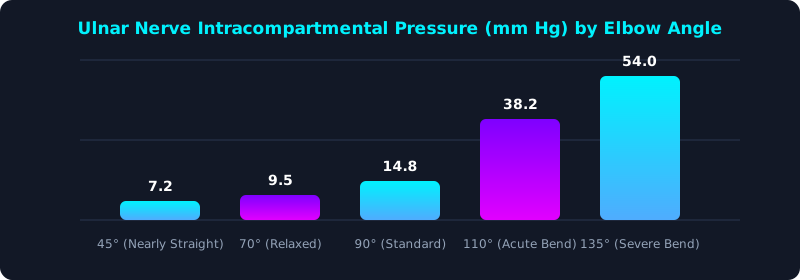
This medical chart illustrates internal fluid pressure inside the cubital tunnel across different elbow angles. Normal resting pressure is under 10 mm Hg.
Notice that bending the elbow past 90 degrees causes internal pressure to surge dramatically, cutting off micro-vascular blood supply to the ulnar nerve. Keeping elbows slightly open (100° to 110° open angle) protects nerve health.
Ergonomic Workstation Interventions for Cubital Health
Preventing cubital tunnel syndrome requires simple but powerful adjustments to your physical workspace geometry.
First, eliminate hard elbow pressure: remove your chair's hard armrests entirely or install thick memory-foam armrest cushions. Never lean your body weight on your elbows while typing or thinking at your desk.
Second, adjust your keyboard tray so your elbows rest at a comfortable, open 100-to-110-degree angle with forearms slightly sloping downward toward your keys.
Third, perform gentle 'ulnar nerve flossing' exercises throughout the day to encourage the nerve to glide smoothly through the cubital canal.
5-Step Cubital Tunnel Prevention & Recovery Blueprint
- Open Your Elbow Angle to 100°+: Lower your desk or elevate your chair so your forearms angle slightly downward rather than bending upward acutely.
- Remove or Pad Hard Chair Armrests: Ensure your elbows float freely without resting directly on hard plastic or metal surfaces while typing.
- Practice Daily Ulnar Nerve Glides: Gently bend your elbow, bring your hand up beside your ear, circle your fingers into an 'OK' sign over your eye, and release.
- Avoid Sleeping with Bent Elbows: Wear a soft elbow brace or wrap a towel around your elbow at night to prevent curling your arms tightly during sleep.
- Monitor Your Keystroke Stamina: Track your typing endurance on TypeTestLab Speed Test and immediately pause if you experience tingling in your pinky fingers.
Frequently Asked Questions (FAQ)
Can cubital tunnel syndrome permanently damage my typing speed?
If ignored, chronic severe nerve compression can cause permanent atrophy of the intrinsic hand muscles (claw hand deformity), severely impairing hand dexterity. Early ergonomic intervention completely prevents this.
How do I know if my pinky numbness is from my wrist or elbow?
If numbness affects your little finger and half of your ring finger, the issue is almost certainly the ulnar nerve at the elbow or neck. Carpal tunnel syndrome strictly affects the thumb, index, and middle fingers.
Should I stop typing completely if my elbow aches?
Take a short 48-hour rest, evaluate your workstation ergonomics, and avoid resting on your elbows. If numbness or weakness persists, consult an occupational physical therapist or physician.
What keyboard layout is best for ulnar nerve pain?
Split ergonomic keyboards that allow your arms to rest at shoulder width prevent internal shoulder rotation and keep the cubital tunnel open.
Protect Your Hands and Nerve Health
Master ergonomic typing mechanics and safeguard your lifelong career health.
Take Ergonomic Typing Test ⚡