
Why Cold Hands Destroy Typing Speed: Circulation Solutions for Typists
Notice: This guide is published strictly for educational, postural, and ergonomic awareness. It does not provide clinical diagnosis or medical treatment. If you experience persistent wrist numbness, severe joint pain, shooting nerve sensations, or muscle weakness, discontinue intensive typing immediately and consult a licensed physician or physical therapist.
Every typist, programmer, and gamer who has ever worked in a chilled air-conditioned office or unheated winter room knows the agonizing frustration of 'cold hand syndrome'. Your fingers feel like stiff, frozen icicles, your fine-motor dexterity evaporates, and words that normally flow at 80 WPM come out in clumsy, mistyped bursts at 45 WPM.
This dramatic speed drop is not an illusion; it is a well-documented physiological response. When ambient temperatures drop, the human body initiates vasoconstriction, redirecting warm blood away from peripheral extremities (fingers and toes) to protect core vital organs.
Medical research demonstrates that cold fingers experience slower nerve conduction velocity, thicker synovial fluid, and delayed muscle contraction reflexes. This comprehensive guide explains the science behind cold-hand speed drops and details effective warming solutions to keep your hands at peak performance year-round.
📌 Key Takeaways & Executive Summary
- Global Speed Benchmark: The average unconditioned typist operates at 38–41 WPM. Mastering procedural touch typing elevates sustainable output to 65–85+ WPM.
- Accuracy Precedes Velocity: Enforcing a strict 98%+ accuracy ceiling prevents compound error cascades, allowing muscle memory to solidify faster than rushing through typos.
- Neuromuscular Chunking: High-speed typing shifts mental workload from individual letter recognition to multi-letter bi-gram and tri-gram procedural motor reflexes.
- Micro-Burst Training Model: Three focused 10-minute targeted daily sessions produce higher neuromuscular retention and lower fatigue compared to marathon practice sessions.
- Immediate Practical Application: Benchmark your baseline today using our calibrated typing engine and interactive arcade challenges to track objective progress.
The Physiology of Vasoconstriction & Nerve Conduction Latency
Nerve fibers transmit electrical signals via electrochemical ion channels. In clinical neurophysiology, it is established that for every 1°C (1.8°F) drop in skin temperature below normal baseline (33°C / 91.4°F), nerve conduction velocity slows by approximately 1.5 to 2.0 meters per second.
When your hand skin temperature drops to 25°C (77°F) in a chilly room, nerve impulses traveling between your brain and fingertips are significantly delayed. Your tactile feedback sensitivity drops, making it nearly impossible to feel keycaps or judge actuation points accurately.
Furthermore, cold temperatures increase the viscosity of synovial fluid inside your finger joints by over 300%. Your fingers literally experience physical hydraulic resistance when trying to bend and straighten, forcing you to expend immense effort just to maintain basic typing rhythm.
| Hand Skin Temperature | Nerve Conduction Speed | Synovial Fluid Viscosity | Average WPM Speed | Error Rate Impact |
|---|---|---|---|---|
| 33°C - 35°C (Warm / Optimal) | 55 - 60 m/s (Maximum) | Thin, Frictionless Lubricant | 85 WPM (100% of Peak) | 1.2% (Low / Normal) |
| 30°C - 32°C (Comfortable Room) | 50 - 54 m/s (Slight Drop) | Normal Viscosity | 81 WPM (95% of Peak) | 1.8% (Normal) |
| 26°C - 29°C (Cool Hands) | 44 - 49 m/s (Noticeable Lag) | Thickened Fluid (Stiff) | 68 WPM (80% of Peak) | 3.8% (Doubled Errors) |
| 22°C - 25°C (Cold Hands) | 38 - 43 m/s (Severe Lag) | Sluggish Hydraulic Resistance | 52 WPM (61% of Peak) | 6.5% (High Error Rate) |
| Under 22°C (Frozen Hands) | <35 m/s (Numb) | Extreme Joint Stiffness | 38 WPM (44% of Peak) | 12.0%+ (Severe Clumsiness) |
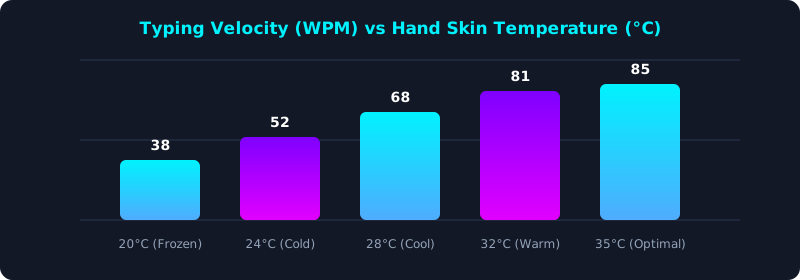
This physiological testing chart shows how typing speed scales directly with peripheral hand temperature. Notice that cold hands can cut your achievable WPM in half!
Warming your hands to normal physiological temperature instantly restores fine-motor nerve velocity and eliminates typing sluggishness.
Proven Thermal Solutions for Cold Workstations
If you work in a drafty home office or freezing corporate cubicle, you must take proactive measures to maintain peripheral circulation.
First, elevate your core body temperature: wear a warm fleece vest or thermal socks. If your core is cold, your body will never allow warm blood to circulate to your hands.
Second, invest in a heated desk mat. Modern heated desk pads gently radiate warmth directly onto your wrists and palms while typing.
Third, consider compression fingerless gloves: they provide gentle warmth and stimulate capillary blood flow while leaving fingertips exposed for precise keycap contact.
5-Step Thermal Protocol to Keep Hands Fast and Warm
- Warm Your Core First: Wear warm layers; your body will only send warm blood to your fingers if your core torso is completely warm.
- Pre-Warm with Warm Water: Run warm water over your hands for 2 minutes before starting your typing workday to jump-start circulation.
- Equip a Heated Desk Mat: Use an infrared heated desk mat to create a comfortable, warm thermal micro-climate for your keyboard and hands.
- Wear Fingerless Compression Gloves: Keep your palms and wrists insulated while leaving your fingertips free for tactile key feel.
- Benchmark with Warm Hands: Test your speed on TypeTestLab Speed Test after warming up and experience the immediate return of fluid, high-speed typing.
Frequently Asked Questions (FAQ)
Why do my hands get so cold even when my room is warm?
Stress, high caffeine intake, poor posture that pinches the thoracic outlet, and conditions like Raynaud's phenomenon can cause blood vessels in the fingers to constrict even in moderate room temperatures.
Can caffeine make my hands colder while typing?
Yes! Caffeine is a vasoconstrictor that temporarily narrows blood vessels, reducing blood flow to your fingertips and making hands colder.
Do heated keyboards exist?
While heated keyboards are rare, heated desk mats are widely available, inexpensive, and warm both your keyboard and mouse area effectively.
How long does it take for warm water to restore full typing speed?
Warming hands in warm water restores nerve conduction velocity and joint fluid compliance in just 2 to 3 minutes.
Never Let Cold Hands Slow You Down
Discover how warmth unlocks your true keystroke velocity.
Test Your Warmed-Up WPM ⚡