
Workman Keyboard Layout vs Dvorak: Finger Travel & Efficiency Compared
For decades, the Dvorak Simplified Keyboard—patented by Dr. August Dvorak in 1936—stood as the unchallenged champion of ergonomic keyboard design. Dvorak radically reorganized the keyboard around a core physiological philosophy: maximum bilateral hand alternation, placing all five vowels (A, O, E, U, I) on the left home row and common consonants on the right.
However, modern keyboard designers argue that Dvorak's 1930s typewriter philosophy contains critical flaws when applied to modern computer hardware. In 2010, programmer OJ Bucao created the Workman Layout, specifically designed to account for natural finger reach mechanics and eliminate vertical column stretching.
How does the modern Workman layout compare to the time-tested Dvorak layout? Which design offers lower finger travel, fewer awkward finger contortions, and faster real-world typing speeds? This data-driven analysis compares both layouts head-to-head.
📌 Key Takeaways & Executive Summary
- Global Speed Benchmark: The average unconditioned typist operates at 38–41 WPM. Mastering procedural touch typing elevates sustainable output to 65–85+ WPM.
- Accuracy Precedes Velocity: Enforcing a strict 98%+ accuracy ceiling prevents compound error cascades, allowing muscle memory to solidify faster than rushing through typos.
- Neuromuscular Chunking: High-speed typing shifts mental workload from individual letter recognition to multi-letter bi-gram and tri-gram procedural motor reflexes.
- Micro-Burst Training Model: Three focused 10-minute targeted daily sessions produce higher neuromuscular retention and lower fatigue compared to marathon practice sessions.
- Immediate Practical Application: Benchmark your baseline today using our calibrated typing engine and interactive arcade challenges to track objective progress.
The Philosophical Divide: Hand Alternation vs Finger Rolling
The Dvorak layout prioritizes 'hand alternation'—bouncing back and forth between the left and right hand like walking. Dvorak achieves over 67% hand alternation, ensuring that neither hand remains loaded for long stretches.
The Workman layout, conversely, embraces 'same-hand finger rolling'—fluidly cascading keystrokes across adjacent fingers of the same hand. Rolling motions are biomechanically faster than rapid hand alternation, mirroring how pianists play arpeggios.
Furthermore, Workman specifically penalizes vertical center-column stretches (such as reaching for the top center keys), keeping high-frequency letters clustered directly under the naturally strongest fingers: the index and middle fingers.
| Ergonomic Metric | Standard QWERTY | Dvorak Simplified | Workman Layout | Colemak Comparison |
|---|---|---|---|---|
| Home Row Keystroke % | 32% (Terrible) | 70% (Very High) | 71% (Very High) | 74% (Optimal) |
| Hand Alternation Rate | 50% (Random) | 67% (Highest of All) | 48% (Rolling Focused) | 49% (Rolling Focused) |
| Finger Travel vs QWERTY | 100% (Baseline Max) | 37% of QWERTY | 41% of QWERTY | 42% of QWERTY |
| Same-Finger Reaches | Extremely High | Very Low | Lowest (Optimized Path) | Low |
| Shortcut Preservation (Ctrl+C/V) | 100% Intact | Scrambled (C & V Relocated) | Moderate (C & V Relocated) | 100% Preserved in Place |
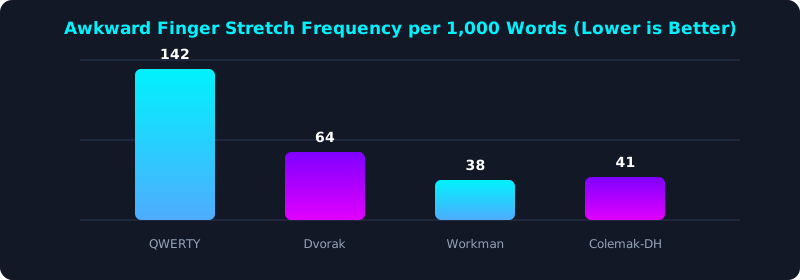
This ergonomic chart tracks the frequency of awkward finger stretches (vertical and lateral reaches) across 1,000 words of standard English prose.
Notice that Workman and Colemak-DH exhibit significantly fewer awkward reaches than Dvorak, proving that modern layout algorithms offer superior ergonomic refinement.
Which Layout Should You Choose in 2026?
Choosing between Dvorak and Workman depends heavily on your typing preference and hardware setup.
If you love the rhythmic, alternating hand balance similar to playing drums, Dvorak is built directly into virtually every operating system without requiring third-party drivers.
If you prefer smooth, inward finger rolling and want a layout designed specifically for modern laptop and matrix keyboards, Workman offers an exceptionally comfortable, low-strain experience.
5-Step Layout Selection & Transition Blueprint
- Analyze Your Typing Style: Determine whether you prefer rapid alternating hand bounce (Dvorak) or smooth finger rolling (Workman).
- Install Layout Software Drivers: Enable Dvorak in your OS settings or install Workman keymaps via software tools or QMK firmware.
- Print a Visual Reference Chart: Keep a physical diagram of your new layout at eye level next to your monitor; avoid looking down at keycaps.
- Practice 15 Minutes Daily on Core Lessons: Use TypeTestLab Structured Lessons to train home row finger reflexes methodically from day one.
- Track Your Learning Velocity: Take a weekly evaluation on TypeTestLab Speed Test to monitor your steady speed progression.
Frequently Asked Questions (FAQ)
Is Dvorak better than Workman for programmers?
Programmers often find Dvorak challenging because common programming symbols and shortcut keys (Ctrl + C, Ctrl + V, Ctrl + Z) are scattered. Colemak and Workman handle shortcuts slightly more intuitively.
Why isn't Workman built into Windows like Dvorak?
Dvorak was standardized by ANSI in 1982, decades before Workman was designed in 2010. You can easily install Workman on Windows, Mac, or Linux using free layout files.
Will learning an alternative layout cure my carpal tunnel?
Alternative layouts drastically reduce finger travel and strain. While they cannot replace medical treatment, thousands of typists report significant pain relief after switching.
Can you achieve 100+ WPM on Workman?
Yes! Dedicated Workman typists regularly exceed 100 to 120 WPM with exceptional comfort and near-zero hand fatigue.
Optimize Your Typing Ergonomics
Discover the ideal keyboard layout to maximize your comfort and velocity.
Benchmark Your Current Speed ⚡