
General Audio Transcription: Foot Pedals, Timestamping & WPM Multiplication
Professional general transcriptionists—transcribing business conferences, podcasts, academic research interviews, focus groups, and financial earnings calls—turn raw spoken audio into accurate, published written records for global clients on platforms like Rev, TranscribeMe, GoTranscript, and specialized agencies.
Unlike office workers who type thoughts or copy written text, transcriptionists must process continuous auditory streams in real time. Because normal human speech flows at 130 to 170 words per minute, typing speed directly governs how many audio minutes a transcriptionist can complete per hour.
While beginner transcriptionists operate at a sluggish 4:1 ratio (taking 4 hours to transcribe 1 hour of audio), elite professionals utilizing USB foot pedals and typing at 80 to 95+ WPM operate at a 2:1 or better ratio, doubling their effective hourly earnings.
📌 Key Takeaways & Executive Summary
- Global Speed Benchmark: The average unconditioned typist operates at 38–41 WPM. Mastering procedural touch typing elevates sustainable output to 65–85+ WPM.
- Accuracy Precedes Velocity: Enforcing a strict 98%+ accuracy ceiling prevents compound error cascades, allowing muscle memory to solidify faster than rushing through typos.
- Neuromuscular Chunking: High-speed typing shifts mental workload from individual letter recognition to multi-letter bi-gram and tri-gram procedural motor reflexes.
- Micro-Burst Training Model: Three focused 10-minute targeted daily sessions produce higher neuromuscular retention and lower fatigue compared to marathon practice sessions.
- Immediate Practical Application: Benchmark your baseline today using our calibrated typing engine and interactive arcade challenges to track objective progress.
The Mechanics of Foot Pedal Control & Audio Playback
The cornerstone of professional transcription efficiency is the three-pedal USB foot controller (such as the Infinity USB Foot Pedal). The center pedal plays audio, the left pedal rewinds by a pre-set increment (typically 2 to 3 seconds), and the right pedal fast-forwards.
By controlling audio playback with your foot, your hands never leave the home row keys to touch a mouse or press media hotkeys. This continuous, unbroken keyboard engagement eliminates thousands of micro-pauses during a single transcription session.
Furthermore, professional transcription software (like Express Scribe or InqScribe) allows typists to adjust playback speed dynamically. As your touch typing speed increases, you can accelerate audio playback to 1.2x or 1.4x speed, drastically compressing total production time.
| Transcriptionist Level | Typing Speed (WPM) | Audio-to-Hour Ratio | Average Hourly Billing | Key Equipment Used |
|---|---|---|---|---|
| Beginner Freelancer | 45 - 55 WPM | 4.5 : 1 (4.5h per 1h audio) | $10 - $14 / hr | Standard Keyboard, Mouse Playback |
| Intermediate Transcriptionist | 60 - 70 WPM | 3.0 : 1 (3.0h per 1h audio) | $16 - $22 / hr | Basic Foot Pedal, Express Scribe |
| Advanced Professional | 75 - 85 WPM | 2.2 : 1 (2.2h per 1h audio) | $24 - $32 / hr | Infinity USB Pedal, Text Expansion |
| Master / Specialized Transcriber | 90 - 105 WPM | 1.7 : 1 (1.7h per 1h audio) | $35 - $50+ / hr | Ergonomic Mechanical, Macro Suites |
| Real-Time CART Captioner | 160 - 200+ WPM | 1.0 : 1 (Real-Time Live) | $60 - $100+ / hr | Stenotype Machine or Fast QWERTY Chording |
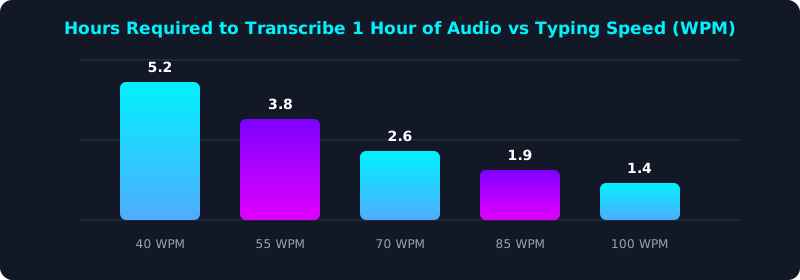
This production efficiency chart shows the total working hours required to transcribe a standard 60-minute audio file across different typing speeds (with foot pedal).
A 90+ WPM transcriber finishes a 1-hour recording in under 2 hours, earning more than double the hourly rate of a 45 WPM beginner.
Timestamping Shortcuts & Text Expansion Suites
Clients frequently require strict timestamping (e.g., [00:14:22]) at speaker changes or regular intervals (such as every 30 seconds). Reaching for a mouse to copy timestamps destroys rhythm.
Mastering global hotkeys (such as F9 or Ctrl + T) allows transcriptionists to insert formatted timestamps instantly without breaking their keystroke cadence.
Combining timestamp shortcuts with text expansion tools (e.g., expanding 'spk1' into 'INTERVIEWER:' or 'inaud' into '[inaudible 00:00:00]') allows professional transcribers to eliminate tens of thousands of repetitive keystrokes every single day.
5-Step Transcription Career Acceleration Blueprint
- Benchmark Your Raw WPM Speed: Take a 5-minute typing test on TypeTestLab Speed Test to gauge your sustained speed and error rate without audio interference.
- Integrate an Infinity USB Foot Pedal: Configure your transcription software with a foot pedal so your hands never leave the keyboard to pause or rewind.
- Configure Text Expansion Snippets: Create shortcuts for speaker labels, standard interview pleasantries, and inaudible tags.
- Practice Audio Dictation Drills: Transcribe YouTube interviews and TED talks at 1.0x and 1.2x playback speed to train ear-to-finger synchronization.
- Certify Your Professional Speed: Obtain an Official Typing Certificate displaying 80+ WPM to attach to agency transcription applications.
Frequently Asked Questions (FAQ)
What typing speed is required to work for transcription companies?
Most online transcription platforms (like Rev or GoTranscript) require a minimum of 60 to 65 WPM. Specialized legal and medical transcription agencies require 75 to 85+ WPM.
Is a foot pedal absolutely necessary for transcription?
While not mandatory for casual work, a foot pedal is virtually indispensable for professional earnings. It saves 1 to 2 hours of labor per audio hour by eliminating manual mouse controls.
What is the difference between verbatim and clean verbatim transcription?
Verbatim transcription captures every stutter, filler word ('um', 'uh', 'you know'), and false start. Clean verbatim smooths out filler words while preserving the exact meaning of the speaker.
How can a transcriptionist break through an 80 WPM plateau?
Practice N-gram word chunking drills and train on an ergonomic mechanical keyboard to reduce finger travel and strain.
Build High-Income Transcription Speed
Master the high-speed touch typing and audio synchronization required for professional transcription.
Take Transcription Speed Assessment ⚡