
Frontend Developer Typing: HTML, CSS & JS Syntax Drills
Frontend web development requires typing a rich mix of HTML markup, CSS styling rules, and JavaScript logic.
From opening angle brackets <div class="container"> to CSS curly braces display: flex; and JS arrow functions const fetchData = async () => {}, frontend developers key hundreds of special characters every hour.
This guide provides targeted syntax drills to build lightning-fast typing mechanics for HTML5, CSS3, and JavaScript ES6+.
📌 Key Takeaways & Executive Summary
- Global Speed Benchmark: The average unconditioned typist operates at 38–41 WPM. Mastering procedural touch typing elevates sustainable output to 65–85+ WPM.
- Accuracy Precedes Velocity: Enforcing a strict 98%+ accuracy ceiling prevents compound error cascades, allowing muscle memory to solidify faster than rushing through typos.
- Neuromuscular Chunking: High-speed typing shifts mental workload from individual letter recognition to multi-letter bi-gram and tri-gram procedural motor reflexes.
- Micro-Burst Training Model: Three focused 10-minute targeted daily sessions produce higher neuromuscular retention and lower fatigue compared to marathon practice sessions.
- Immediate Practical Application: Benchmark your baseline today using our calibrated typing engine and interactive arcade challenges to track objective progress.
Frontend Syntax Breakdown: HTML, CSS & JS
Each frontend technology presents unique keyboard challenges. HTML requires frequent angle brackets and quotes. CSS demands colon-semicolon precision. JavaScript requires nested callbacks, template literals, and destructured objects.
| Technology | Syntax Pattern | High-Frequency Keys | Recommended Typing Drill |
|---|---|---|---|
| HTML5 | ... | <, >, ", =, /, !-- -- | Tag Bracket & Attribute Drills |
| CSS3 / SCSS | display: flex; justify-content: center; | :, ;, {, }, #, ., %, px | Property-Value Pair Drills |
| JavaScript ES6+ | const fn = async (req, res) => {} | =>, {}, [], (), ===, ``, ... | Arrow Function & Async Drills |
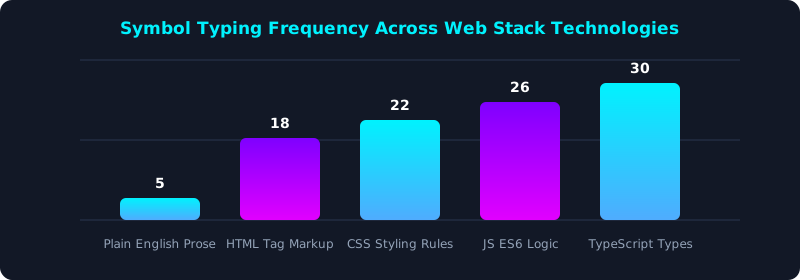
This graph illustrates the high percentage of special characters present across modern frontend technology stacks.
Leveraging Emmet Shortcuts for HTML/CSS Expansion
Emmet abbreviations allow frontend developers to type short snippets (e.g., div.card>ul>li*3) and press Tab to expand complete HTML structures instantly.
5-Step Frontend Typing Optimization Regimen
- Train Angle Bracket & Quote Touch Reaches: Practice HTML tag syntax on TypeTestLab Structured Lessons.
- Master CSS Colon & Semicolon Precision: Key property-value pairs without looking down at punctuation keys.
- Practice JavaScript ES6 Arrow Functions: Build muscle memory for
=>and destructuring syntax. - Memorize Core Emmet Abbreviations: Use Emmet abbreviations to expand HTML/CSS structures effortlessly.
- Test Your Frontend Coding Speed: Measure your code typing velocity on TypeTestLab Speed Test.
Frequently Asked Questions (FAQ)
Does typing speed matter for frontend developers?
Yes! High typing speed enables rapid UI iteration, faster debugging, seamless live prototyping, and unhindered creative flow.
How can I type HTML tags faster?
Combine 10-finger touch typing for angle brackets with Emmet abbreviation shortcuts to expand complex markup structures instantly.
Why do JavaScript backticks cause typing errors?
Backticks (`) reside on the top-left key above Tab, requiring a pinky extension that needs targeted muscle memory training.
Should frontend developers use mechanical keyboards?
Yes, mechanical switches with light tactile feedback reduce finger strain during long frontend coding sessions.
Where can I find frontend code typing exercises?
Access specialized HTML5, CSS3, and JavaScript ES6+ syntax drills directly on TypeTestLab Structured Lessons.
Master Frontend Code Typing
Build fast HTML, CSS, and JS typing skills on TypeTestLab.
Start Web Dev Drills ⚡