
1000Hz vs 8000Hz Keyboard Polling Rate: Does Latency Affect Typing WPM?
In modern mechanical keyboard marketing, technical specifications are frequently pushed to extremes. Manufacturers proudly advertise ultra-high USB polling rates: leaping from the long-standing 1,000Hz (1 millisecond) standard to 4,000Hz (0.25ms) and even 8,000Hz (0.125ms) hyper-polling rates.
Gaming peripheral companies claim that 8,000Hz polling delivers 'near-zero latency' and eliminates micro-delays between finger strikes and on-screen registration. Enthusiasts naturally wonder: Does upgrading to an 8,000Hz keyboard make you type faster? Can lower input latency improve your Words Per Minute on competitive speed tests?
This latency investigation evaluates USB scanning physics, CPU processing overhead, human fine-motor reaction limits, and typing test telemetry to definitively determine whether hyper-polling rates matter for touch typing.
📌 Key Takeaways & Executive Summary
- Global Speed Benchmark: The average unconditioned typist operates at 38–41 WPM. Mastering procedural touch typing elevates sustainable output to 65–85+ WPM.
- Accuracy Precedes Velocity: Enforcing a strict 98%+ accuracy ceiling prevents compound error cascades, allowing muscle memory to solidify faster than rushing through typos.
- Neuromuscular Chunking: High-speed typing shifts mental workload from individual letter recognition to multi-letter bi-gram and tri-gram procedural motor reflexes.
- Micro-Burst Training Model: Three focused 10-minute targeted daily sessions produce higher neuromuscular retention and lower fatigue compared to marathon practice sessions.
- Immediate Practical Application: Benchmark your baseline today using our calibrated typing engine and interactive arcade challenges to track objective progress.
USB Polling Physics: Milliseconds vs Human Reaction Times
A keyboard's polling rate determines how many times per second the computer queries the USB controller for new keystroke events. An office keyboard operating at 125Hz checks every 8 milliseconds. A standard gaming keyboard at 1,000Hz checks every 1 millisecond. An 8,000Hz keyboard checks every 0.125 milliseconds.
The difference between 1,000Hz and 8,000Hz is exactly 0.875 milliseconds—less than one single thousandth of a second. To put this in physiological context: the human optical nerve takes 10 to 15 milliseconds just to transmit visual signals from the eye to the brain, and the fastest human neuromuscular reflex takes roughly 100 to 120 milliseconds.
A latency variance of 0.875 milliseconds is entirely invisible to human biology and has virtually zero statistical impact on typing speed.
| USB Polling Rate | Query Interval (Latency) | Keystroke Scan Latency | CPU Overhead Impact | Perceptible WPM Difference |
|---|---|---|---|---|
| 125 Hz (Basic Office) | 8.0 Milliseconds | Noticeable Micro-Delay in Fast Typing | Negligible (0% CPU) | May Clip 1-2 WPM on Fast Rolls |
| 500 Hz (Standard USB) | 2.0 Milliseconds | Very Responsive & Crisp | Minimal | Zero Observable Impact |
| 1,000 Hz (Standard Gaming) | 1.0 Millisecond | Golden Standard for Professional Speed | Extremely Low | Optimal for 100% of Typists |
| 4,000 Hz (High Polling) | 0.25 Milliseconds | Imperceptible Difference | Moderate (Noticeable on Older CPUs) | Zero WPM Improvement |
| 8,000 Hz (Hyper-Polling) | 0.125 Milliseconds | Physiologically Undetectable | High (Can Cause Frame Drops in Games) | Zero WPM Improvement |
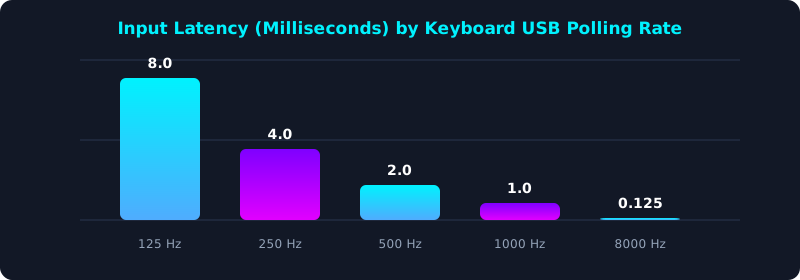
This latency comparison shows the hardware query delay across standard polling rates. Notice the massive drop from 125Hz (8ms) down to 1,000Hz (1ms).
Upgrading from 125Hz to 1,000Hz makes a noticeable difference in keystroke responsiveness. However, moving past 1,000Hz yields diminishing returns that offer no practical benefit for typing.
Matrix Scanning Latency: The Hidden Bottleneck
What keyboard marketing often conceals is that USB polling rate is only the final step in a multi-stage latency pipeline. Before a keystroke is transmitted over USB, the keyboard's internal microcontroller must scan the physical key matrix and apply debounce filtering.
Traditional mechanical switches use debounce algorithms (typically 5 to 10 milliseconds) to prevent electrical chatter from registering as duplicate keystrokes. An 8,000Hz keyboard with slow 10ms debounce software is actually slower than a 1,000Hz keyboard with 1ms optical or Hall Effect debounce!
For typists, switch smoothness, stable stabilizers, and comfortable ergonomics impact WPM far more than microscopic polling numbers.
5-Step Latency Optimization Blueprint for Typists
- Ensure a Minimum 1,000Hz Polling Rate: Verify your keyboard operates at least at 1,000Hz to eliminate the sluggish 8ms latency of 125Hz office keyboards.
- Avoid Unnecessary 8,000Hz CPU Drain: Unless you are a professional esports player with a high-end CPU, 1,000Hz is optimal and avoids background CPU load.
- Choose Low-Debounce Switches: Optical or magnetic Hall Effect switches eliminate mechanical debounce delays, ensuring instantaneous keystroke registration.
- Focus on Biomechanical Rhythm: Do not obsess over milliseconds; invest your training time into mastering home row discipline and N-gram chunking.
- Benchmark Your Live Performance: Test your speed on TypeTestLab Speed Test and observe how proper mechanics matter infinitely more than polling hype.
Frequently Asked Questions (FAQ)
Can an 8,000Hz keyboard make me type faster?
No. The 0.875ms latency difference is far too microscopic to impact human typing speed. Your finger mechanics, posture, and motor memory govern 99.9% of your WPM.
Why does my computer feel sluggish when using an 8,000Hz keyboard?
8,000Hz polling sends 8,000 interrupts to your operating system CPU every second, which can cause micro-stutters on older processors or background system processes.
What polling rate is best for competitive typing?
1,000Hz (1 millisecond) is universally considered the golden standard by competitive typing champions.
Does Bluetooth have worse polling rates than wired keyboards?
Yes. Most standard Bluetooth connections operate at 125Hz to 133Hz, which can introduce noticeable latency during rapid 100+ WPM typing bursts.
Focus on What Truly Drives Typing Speed
Master genuine keyboard mechanics and build lasting typing velocity.
Take Free Speed Assessment ⚡