

50 Essential Keyboard Shortcuts Every Windows & Mac Typist Must Know
Every time you reach for your mouse to highlight text, copy a line, switch browser tabs, or close a window, you interrupt your typing flow and lose valuable seconds.
Computer power users and top software developers operate almost entirely via keyboard shortcuts. By mastering system-level, browser, and text-editing hotkeys, you can eliminate mouse dependence and boost daily productivity by up to 30%.
This ultimate reference guide presents 50 essential keyboard shortcuts across Windows and macOS.
📌 Key Takeaways & Executive Summary
- Global Speed Benchmark: The average unconditioned typist operates at 38–41 WPM. Mastering procedural touch typing elevates sustainable output to 65–85+ WPM.
- Accuracy Precedes Velocity: Enforcing a strict 98%+ accuracy ceiling prevents compound error cascades, allowing muscle memory to solidify faster than rushing through typos.
- Neuromuscular Chunking: High-speed typing shifts mental workload from individual letter recognition to multi-letter bi-gram and tri-gram procedural motor reflexes.
- Micro-Burst Training Model: Three focused 10-minute targeted daily sessions produce higher neuromuscular retention and lower fatigue compared to marathon practice sessions.
- Immediate Practical Application: Benchmark your baseline today using our calibrated typing engine and interactive arcade challenges to track objective progress.
Text Editing & Word-Level Navigation Shortcuts
Navigating text character-by-character using arrow keys is extremely slow. Combining Control (or Option) with arrow keys allows you to jump full words instantly.
| Action Description | Windows Shortcut | Mac Shortcut | Productivity Impact |
|---|---|---|---|
| Jump One Word Left / Right | Ctrl + Left / Right Arrow | Option + Left / Right Arrow | Instant Word-Level Navigation |
| Jump to Start / End of Line | Home / End Key | Cmd + Left / Right Arrow | Instant Line Boundary Jump |
| Highlight Full Word | Ctrl + Shift + Left / Right | Option + Shift + Left / Right | Rapid Text Selection |
| Delete Full Word Backward | Ctrl + Backspace | Option + Delete | Instant Word Deletion |
| Duplicate Current Line | Shift + Alt + Down | Option + Shift + Down | Lightning Code / Text Duplication |
| Move Line Up / Down | Alt + Up / Down | Option + Up / Down | Instant Line Reordering |
| Undo / Redo Action | Ctrl + Z / Ctrl + Y | Cmd + Z / Cmd + Shift + Z | Rapid Error Recovery |
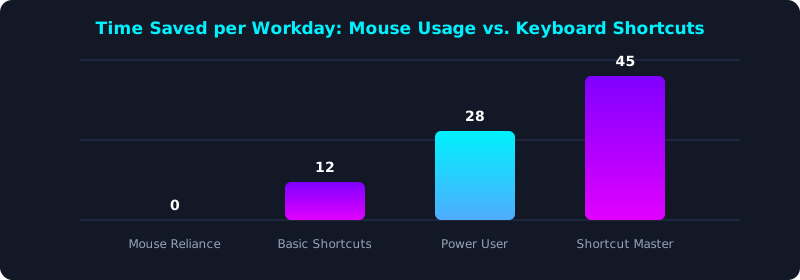
This chart illustrates daily minutes saved as typists transition from mouse reliance to keyboard shortcut mastery.
System & Browser Navigation Hotkeys
Mastering browser tab switching (Ctrl+Tab, Ctrl+W, Ctrl+Shift+T) and window snapping (Win+Arrow) streamlines multi-application workflows.
5 Steps to Build Shortcut Muscle Memory
- Learn 5 New Shortcuts per Week: Focus on mastering a small cluster of hotkeys until automated.
- Unplug Your Mouse for 1 Hour Daily: Force yourself to navigate applications using keyboard commands only.
- Practice Text Selection Drills: Train word-jump shortcuts on TypeTestLab Structured Lessons.
- Customize IDE / OS Keybindings: Map high-frequency actions to comfortable home-row shortcuts.
- Test Your Shortcut Speed: Measure your overall speed on TypeTestLab Speed Test.
Frequently Asked Questions (FAQ)
Why are keyboard shortcuts faster than using a mouse?
Keyboard shortcuts execute commands in milliseconds without taking your hands off the home row.
What is the most important shortcut for text editing?
Ctrl + Left/Right Arrow (word jump) and Ctrl + Backspace (word delete) are essential.
How can I reopen a accidentally closed browser tab?
Press Ctrl + Shift + T on Windows or Cmd + Shift + T on Mac.
Can I use Mac shortcuts on a Windows keyboard?
Yes, the Windows key maps to Command and Alt maps to Option on Mac layouts.
Where can I practice keyboard shortcut drills?
Access shortcut exercises on TypeTestLab Structured Lessons.
Master Essential Keyboard Shortcuts Today
Boost your daily productivity with shortcut practice drills on TypeTestLab.
Start Shortcut Drills ⚡