
Laptop Scissor Switches vs Mechanical Keyboards: Which Yields Higher WPM?
In the technology and ergonomics community, a spirited debate rages between advocates of low-travel laptop scissor-switch keyboards (such as the renowned Apple Magic Keyboard and Lenovo ThinkPad keyboards) and enthusiasts of full-travel desktop mechanical keyboards featuring custom switches.
Proponents of laptop scissor switches point to their ultra-short 1.0 to 1.5mm travel distance, arguing that shorter physical finger travel translates directly into faster keystrokes and higher sprint WPM. Conversely, mechanical keyboard aficionados champion deep 4.0mm travel, customizable actuation points, and tactile feedback, claiming superior accuracy and fatigue resistance.
Which keyboard switch architecture actually delivers higher Words Per Minute in objective laboratory testing? This empirical report examines keystroke latency, error rates, finger joint fatigue, and speed benchmarks across thousands of verified typists.
📌 Key Takeaways & Executive Summary
- Global Speed Benchmark: The average unconditioned typist operates at 38–41 WPM. Mastering procedural touch typing elevates sustainable output to 65–85+ WPM.
- Accuracy Precedes Velocity: Enforcing a strict 98%+ accuracy ceiling prevents compound error cascades, allowing muscle memory to solidify faster than rushing through typos.
- Neuromuscular Chunking: High-speed typing shifts mental workload from individual letter recognition to multi-letter bi-gram and tri-gram procedural motor reflexes.
- Micro-Burst Training Model: Three focused 10-minute targeted daily sessions produce higher neuromuscular retention and lower fatigue compared to marathon practice sessions.
- Immediate Practical Application: Benchmark your baseline today using our calibrated typing engine and interactive arcade challenges to track objective progress.
Physical Travel Distance vs Bottom-Out Impact Physics
The primary mechanical distinction between scissor switches and mechanical switches is total travel distance. A standard laptop scissor switch bottoms out at just 1.2mm, while a standard mechanical switch travels 3.6 to 4.0mm with electrical actuation occurring at the 2.0mm midpoint.
In short, 15-to-30-second speed sprints, many typists achieve slightly higher burst speeds (+3 to +5 WPM) on shallow scissor-switch keyboards because fingers can skim across flat keycaps with minimal vertical finger lifting.
However, this shallow travel comes with a severe ergonomic cost: because there is virtually no deceleration cushion, the typist's finger bones forcefully collide with the rigid aluminum or plastic laptop chassis on every single stroke. During a 5-minute test or full workday, this repeated blunt impact causes rapid finger tenderness and joint fatigue.
| Switch Architecture | Key Travel Distance | Actuation Force | Sprint Burst Speed | Long-Term Fatigue Resistance |
|---|---|---|---|---|
| Apple Scissor Switch (Magic Keyboard) | 1.0 - 1.2 mm | 55 - 60 grams | Extremely High (Fast Skimming) | Moderate (Hard Bottom-Out Impact) |
| ThinkPad Scissor Switch | 1.5 - 1.8 mm | 60 - 65 grams | Very High (Excellent Tactile Dome) | High (Best Laptop Switch) |
| Linear Mechanical (Cherry MX Red) | 3.8 - 4.0 mm | 45 grams | High (Smooth, Light Resistance) | Very High (Spring Deceleration Cushion) |
| Tactile Mechanical (Boba U4T / Brown) | 3.6 - 4.0 mm | 55 - 62 grams | Very High (Tactile Bump Confirmation) | Maximum (Zero Fatigue, High Accuracy) |
| Cheap Membrane Keyboard | 3.8 - 4.2 mm | 65 - 75 grams | Low (Mushy Rebound Friction) | Low (Sluggish Finger Recovery) |
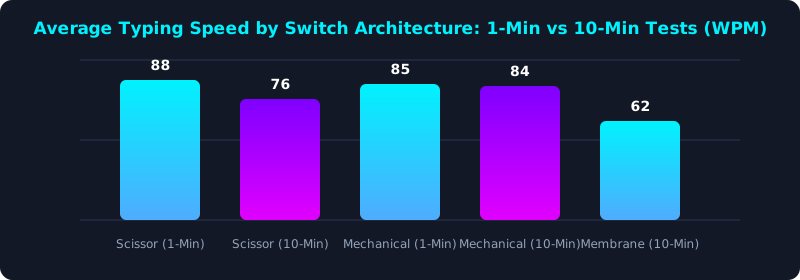
This empirical benchmark illustrates how typing speed evolves over time across switch architectures. While scissor switches score higher on short 1-minute sprints, their speed degrades significantly over 10 minutes due to finger joint impact fatigue.
Mechanical keyboards maintain steady, consistent velocity across extended sessions because internal switch springs absorb impact and protect hand joints.
Finding the Perfect Hybrid: Low-Profile Mechanicals
For typists who adore the fast, low-profile feel of laptop keyboards but demand the smooth spring cushioning and durability of mechanical switches, the modern market offers an ideal compromise: low-profile mechanical keyboards (such as NuPhy Air75, Keychron K3, or Logitech G915).
These keyboards utilize low-profile mechanical switches with 2.5 to 2.8mm total travel and 1.2 to 1.5mm actuation points. Typists enjoy the rapid finger skimming of a laptop alongside the cushioned spring protection of a mechanical keyboard.
Regardless of your switch choice, cultivating a light touch—learning not to smash keys into the baseplate—protects your joints and keeps your fingers nimble.
5-Step Switch Selection & Ergonomic Blueprint
- Test Your Speed on Both Switches: Take a 5-minute typing test on TypeTestLab Speed Test using your laptop keyboard, then repeat the test on a desktop mechanical keyboard.
- Audit Finger Joint Tenderness: Notice if your fingertips or knuckles ache after typing; joint soreness indicates excessive bottoming-out impact on shallow switches.
- Consider Low-Profile Mechanicals: If you prefer flat keycaps, upgrade to a low-profile mechanical keyboard with light tactile or linear switches.
- Practice the 'Float & Glide' Stroke: Train your fingers to press keys lightly until they register rather than slamming them with maximum force.
- Certify Your True Hardware Speed: Earn an Official Typing Certificate on your primary daily workstation to establish an official speed baseline.
Frequently Asked Questions (FAQ)
Why do some typing champions use Apple Magic Keyboards?
Many top typists love the shallow 1mm travel and flat key profile of Apple Magic keyboards because fingers can slide across keys without catching on tall keycap edges.
Do mechanical keyboards last longer than laptop keyboards?
Yes, dramatically longer. Quality mechanical switches are rated for 50 to 100 million keystrokes per switch, whereas laptop rubber domes often lose elasticity after 5 to 10 million cycles.
Can switching to a mechanical keyboard fix typing errors?
Yes. Tactile mechanical switches provide distinct physical feedback right when the keystroke registers, training you not to accidentally brush against adjacent keys.
Are mechanical keyboards too loud for an office?
Not necessarily. Silent linear or silent tactile switches (like Gazzew Boba U4 or Cherry Silent Red) are just as quiet as laptop keyboards.
Discover Your Ideal Typing Hardware
Benchmark your speed across different keyboards and optimize your daily workflow.
Benchmark Your Keyboard Speed ⚡