
10-Key Numpad Touch Typing Guide & KPH Speed Calculation
For accounting professionals, bank tellers, billing clerks, data entry specialists, and inventory managers, numeric keypad speed is a crucial skill.
While standard typing tests measure Words Per Minute (WPM), numeric data entry is evaluated in Keystrokes Per Hour (KPH). Mastering 10-key touch typing allows you to enter numerical data blindly at speeds exceeding 10,000 to 12,000 KPH.
This guide covers 10-key home placement (4 5 6), finger assignment matrices, KPH calculation formulas, and precision drills.
📌 Key Takeaways & Executive Summary
- Global Speed Benchmark: The average unconditioned typist operates at 38–41 WPM. Mastering procedural touch typing elevates sustainable output to 65–85+ WPM.
- Accuracy Precedes Velocity: Enforcing a strict 98%+ accuracy ceiling prevents compound error cascades, allowing muscle memory to solidify faster than rushing through typos.
- Neuromuscular Chunking: High-speed typing shifts mental workload from individual letter recognition to multi-letter bi-gram and tri-gram procedural motor reflexes.
- Micro-Burst Training Model: Three focused 10-minute targeted daily sessions produce higher neuromuscular retention and lower fatigue compared to marathon practice sessions.
- Immediate Practical Application: Benchmark your baseline today using our calibrated typing engine and interactive arcade challenges to track objective progress.
10-Key Home Row Placement & Finger Assignment Matrix
The 10-key numeric pad is organized in a 3x3 grid with zero at the bottom. The home row consists of 4, 5, 6.
The 5 key features a tactile raised ridge. The right hand middle finger rests on 5, the index finger on 4, and the ring finger on 6.
| Finger | 10-Key Home Anchor | Assigned Keys | Primary Action Focus |
|---|---|---|---|
| Right Thumb | 0 (Zero Key) | 0, 00 | Wide Bottom Zero Bar |
| Right Index Finger | 4 Key | 7, 4, 1 | Left Numeric Column |
| Right Middle Finger | 5 Key (Tactile Ridge) | 8, 5, 2, / | Center Column & Division |
| Right Ring Finger | 6 Key | 9, 6, 3, * | Right Column & Multiplication |
| Right Pinky Finger | Enter Key | +, -, Enter | Operators & Field Execution |
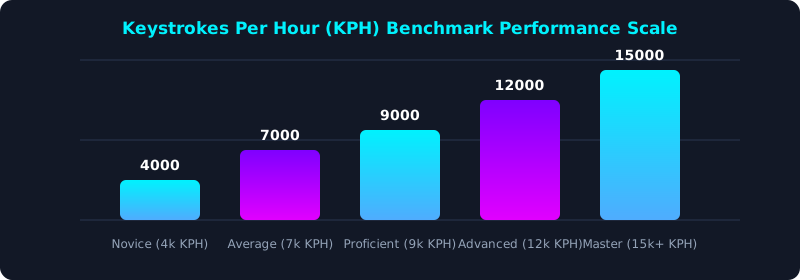
This benchmark chart illustrates KPH speed tiers for numeric data entry professionals.
KPH Calculation Formula & Conversion to WPM
KPH Formula: KPH = (Total Keystrokes / Test Time in Minutes) * 60.
To convert KPH to standardized WPM, divide KPH by 300. For example, 12,000 KPH equals 40 WPM of continuous numeric input.
5-Step 10-Key Numpad Mastery Regimen
- Anchor Middle Finger on 5 Key Ridge: Practice locating 5 by touch using TypeTestLab Structured Lessons.
- Keep Eyes on Source Documents: Never look down at the numpad; enter digits entirely by touch.
- Operate Enter Key with Right Pinky: Use your right pinky to press Enter without shifting your palm.
- Perform 10-Key Timed Sprints: Practice numeric drills on TypeTestLab Structured Lessons.
- Calculate Certified KPH Score: Calculate your KPH score and export your verified results on Official Typing Certificate.
Frequently Asked Questions (FAQ)
What is a good 10-key KPH speed for data entry?
8,000 KPH is the standard requirement; 10,000 to 12,000+ KPH is considered advanced.
How do I calculate KPH from a 5-minute test?
Multiply your total 5-minute keystroke count by 12 to determine your hourly KPH rate.
Why is the 5 key raised on number pads?
The raised ridge on the 5 key provides tactile orientation for blind 10-key touch typing.
Can I use laptop top number keys for 10-key tests?
No, true 10-key speed requires a dedicated 3x3 numeric keypad layout.
Where can I test my 10-key KPH speed?
Test your numeric KPH on our interactive Career WPM Matrix.
Calculate Your 10-Key KPH Speed
Test your numeric keypad speed on TypeTestLab's job matrix calculator.
Access KPH Calculator ⚡