
SDR & Tech Sales Typing Speed: Fast Salesforce & HubSpot CRM Logging
In high-growth B2B software, SaaS, and technology sales across Silicon Valley, New York, London, and Austin, Sales Development Representatives (SDRs) and Account Executives (AEs) operate in a fiercely competitive, metrics-driven environment.
SDRs are measured relentlessly on activity volume: 60 to 100 cold outbound calls, personalized cold email sequences, LinkedIn InMail touches, and rapid inbound lead responses daily. Every conversation must be immediately logged into Customer Relationship Management (CRM) platforms like Salesforce and HubSpot, complete with qualification notes, pain points, decision-maker titles, and scheduled follow-up tasks.
A sales rep who types at 40 WPM spends half their day buried in administrative CRM entry. Conversely, an elite sales rep typing at 75+ WPM logs calls in seconds, allowing them to make 30% more daily prospect contacts and consistently surpass revenue quotas.
📌 Key Takeaways & Executive Summary
- Global Speed Benchmark: The average unconditioned typist operates at 38–41 WPM. Mastering procedural touch typing elevates sustainable output to 65–85+ WPM.
- Accuracy Precedes Velocity: Enforcing a strict 98%+ accuracy ceiling prevents compound error cascades, allowing muscle memory to solidify faster than rushing through typos.
- Neuromuscular Chunking: High-speed typing shifts mental workload from individual letter recognition to multi-letter bi-gram and tri-gram procedural motor reflexes.
- Micro-Burst Training Model: Three focused 10-minute targeted daily sessions produce higher neuromuscular retention and lower fatigue compared to marathon practice sessions.
- Immediate Practical Application: Benchmark your baseline today using our calibrated typing engine and interactive arcade challenges to track objective progress.
The Sales Velocity Equation: Keystrokes to Revenue
In enterprise software sales, speed to lead is decisive. Research shows that responding to an inbound web lead within 5 minutes increases conversion rates by nearly 400% compared to a 30-minute delay. Fast typing allows SDRs to customize response emails instantly before a competitor reaches the prospect.
During live discovery calls, Account Executives must practice active listening while capturing prospect pain points, budget constraints, and technical requirements. An AE typing at 70 WPM captures comprehensive notes in real time without missing conversational cues.
A slow typist, by contrast, either takes superficial notes that compromise subsequent product demos or stays after hours manually reconstructing CRM records from scratch.
| Tech Sales Role | Daily Outbound Target | Minimum WPM | Benchmark High-Performer WPM | Primary CRM Platform |
|---|---|---|---|---|
| Sales Development Rep (SDR / BDR) | 80 - 100 Touches | 50 WPM | 75+ WPM | Salesforce, Outreach, Salesloft |
| Inbound Lead Specialist | 60 Inbound Inquiries | 55 WPM | 80+ WPM | HubSpot, Intercom, Drift |
| Account Executive (AE) | 4 - 6 Demos Daily | 50 WPM | 70 WPM | Salesforce, Gong, Clari |
| Customer Success Manager (CSM) | 15 - 20 Client Touchpoints | 50 WPM | 65 WPM | Gainsight, HubSpot, Zendesk |
| Enterprise Sales Director | Strategic Pipeline Reviews | 45 WPM | 65 WPM | Salesforce, Google Docs, Slack |
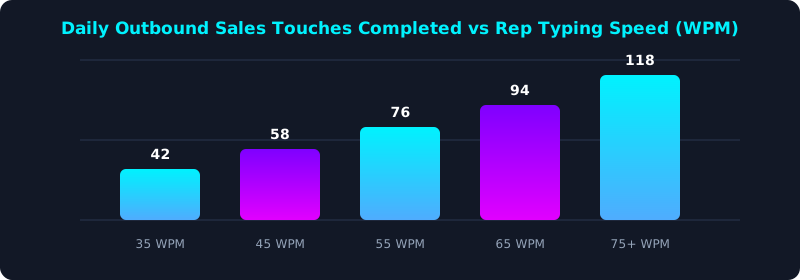
This sales performance chart illustrates daily completed outbound prospecting activities based on SDR typing speed brackets.
Sales reps typing at 75+ WPM achieve over 115 daily prospect touches—nearly triple the output of slow typists—leading directly to higher pipeline generation and commission earnings.
Text Expansion & Keyboard Shortcuts for Sales Pros
High-performing tech sales professionals combine rapid touch typing with productivity software. Utilizing text snippet expanders (like TextExpander or Magical) allows reps to insert standardized cold email frameworks, meeting scheduling links, and qualification questions with simple keystrokes.
Additionally, mastering CRM keyboard shortcuts (such as Salesforce console navigation, quick log call hotkeys, and tab navigation) eliminates thousands of mouse movements every week.
Adopting an ergonomic keyboard with smooth linear switches ensures sales reps can type high-volume email campaigns without experiencing finger fatigue or wrist pain.
5-Step Tech Sales Keyboarding Acceleration Blueprint
- Evaluate Your Sales Typing Speed: Take a 3-minute timed evaluation on TypeTestLab Speed Test to measure your baseline speed and error penalties.
- Practice Live Discovery Call Notes: Listen to recorded sales calls (via Gong or YouTube) and practice typing pain points in bullet format without looking at keys.
- Implement Text Expansion Snippets: Create quick keystroke shortcuts for your common email intros, case study links, and meeting invites.
- Master CRM Keyboard Navigation: Learn keyboard shortcuts in Salesforce or HubSpot to switch tabs, log calls, and create tasks without using a mouse.
- Earn an Official Career Certificate: Obtain an Official Typing Certificate validating your 70+ WPM speed to showcase your operational drive during sales interviews.
Frequently Asked Questions (FAQ)
Does typing speed really matter for tech sales professionals?
Yes. Elite sales leaders prioritize typing speed because SDRs who type fast spend less time on administrative CRM data entry and more time actively prospecting, directly driving higher quota attainment.
What typing speed do top tech companies look for in SDR candidates?
Top SaaS companies (like Salesforce, HubSpot, or Snowflake) look for candidates typing at 55 to 70+ WPM.
How can an SDR avoid wrist pain from heavy daily typing?
Use an ergonomic keyboard, float your wrists while typing, and perform short hand stretches between outbound call blocks.
How long does it take an SDR to improve from 45 to 75 WPM?
With 15 minutes of structured daily touch-typing practice on TypeTestLab, most sales professionals gain 20 to 30 WPM within 6 to 8 weeks.
Crush Your Sales Quotas with Fast Typing
Master rapid CRM logging and cold outreach to maximize your daily sales activity.
Benchmark Your Sales Typing Speed ⚡