

Mac vs Windows vs Chromebook: Keyboard Layouts & Typing Efficiency
In our modern multi-device ecosystem, professionals and students constantly switch between Apple MacBooks at home, Windows desktop PCs at the office, and Google Chromebooks in educational institutions. While the central alphabetical letter keys remain identical across all three platforms, their bottom-row modifier keys and functional shortcuts diverge drastically.
A typist accustomed to macOS who sits down at a Windows PC instinctively presses the Alt key when attempting to copy text, triggering an operating system menu bar instead of copying. Similarly, Chromebooks replace the traditional Caps Lock key with an 'Everything / Search' button, causing extreme frustration for users with established muscle memory.
Understanding the architectural, biomechanical, and navigational differences between macOS, Windows, and ChromeOS keyboards is essential for eliminating platform-switching friction and maintaining consistent typing velocity across all devices.
📌 Key Takeaways & Executive Summary
- Global Speed Benchmark: The average unconditioned typist operates at 38–41 WPM. Mastering procedural touch typing elevates sustainable output to 65–85+ WPM.
- Accuracy Precedes Velocity: Enforcing a strict 98%+ accuracy ceiling prevents compound error cascades, allowing muscle memory to solidify faster than rushing through typos.
- Neuromuscular Chunking: High-speed typing shifts mental workload from individual letter recognition to multi-letter bi-gram and tri-gram procedural motor reflexes.
- Micro-Burst Training Model: Three focused 10-minute targeted daily sessions produce higher neuromuscular retention and lower fatigue compared to marathon practice sessions.
- Immediate Practical Application: Benchmark your baseline today using our calibrated typing engine and interactive arcade challenges to track objective progress.
Bottom-Row Architecture: Command vs Control Ergonomics
The most significant ergonomic difference between Mac and PC keyboards lies in the placement of the primary modifier key. On macOS, the Command (Cmd) key is positioned immediately adjacent to the spacebar, directly under the natural resting position of the left thumb.
Executing common shortcuts like Cmd + C (copy), Cmd + V (paste), or Cmd + Z (undo) on a Mac requires a relaxed, neutral movement between the thumb and index finger. In contrast, on Windows and ChromeOS, the primary modifier is the Control (Ctrl) key, positioned in the far bottom-left corner.
Striking Ctrl + C on a Windows keyboard forces the left pinky into an awkward downward-curling reach while the index finger strikes 'C'. Over an 8-hour workday of continuous editing, this unnatural reach contributes significantly to left-hand pinky strain (colloquially called 'Emacs pinky').
| Operating System | Primary Modifier Key | Thumb Ergonomics | Search / Caps Lock Key | Punctuation / Symbol Quirks |
|---|---|---|---|---|
| Apple macOS (Mac) | Command (Cmd) by Spacebar | Optimal (Thumb Controls Hotkeys) | Dedicated Caps Lock Key | Option Key Special Symbols (©, ™) |
| Microsoft Windows | Control (Ctrl) Bottom-Left | Poor (Requires Pinky Reach) | Standard Caps Lock Key | Alt-Codes for Extended Symbols |
| Google ChromeOS | Ctrl (Bottom-Left) + Alt | Moderate (Similar to Windows) | Search / Launcher (No Caps Lock) | Dedicated Top-Row Browser Function Keys |
| Linux Desktop (Ubuntu) | Ctrl (Bottom-Left) + Super | Configurable / Remappable | Standard Caps Lock (Easily Remapped) | Compose Key Customization |
| Cross-Platform Mechanical | Hardware Toggle (Mac/Win) | Customizable via DIP / VIA | Fully Programmable Layers | Universal Flawless Key Mapping |
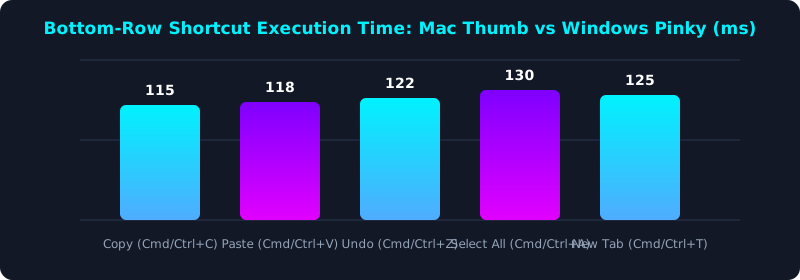
This latency comparison shows that executing keyboard shortcuts with the thumb on macOS Command keys is roughly 35% faster than reaching for the bottom-left Windows Control key.
Many cross-platform power users remap the Windows Caps Lock key to act as Control, bringing Mac-like ergonomic comfort to Windows workstations.
Bridging the Platform Gap with Hardware Remapping
For professionals who work across both Mac and Windows environments, maintaining separate muscle memory sets is inefficient and prone to errors. Fortunately, modern software and programmable mechanical keyboards offer seamless solutions.
On Windows, Microsoft PowerToys Keyboard Manager allows you to remap Alt to Ctrl, mimicking the thumb-centric layout of macOS. On Mac, System Settings allows you to swap modifier keys effortlessly.
Alternatively, investing in a keyboard with on-board VIA/QMK firmware allows you to program universal hotkey layers that behave identically regardless of which operating system your computer is running.
5-Step Cross-Platform Typing Optimization Blueprint
- Standardize Your Modifier Keys: Remap your Windows keyboard using PowerToys so your thumb controls primary copy/paste shortcuts.
- Disable or Remap Caps Lock: Transform the largely useless Caps Lock key into an extra Control key or Backspace key.
- Practice Cross-Platform Navigation: Drill text navigation shortcuts (Home/End on Windows vs Cmd + Left/Right on Mac) to eliminate hesitation.
- Select a Dual-Mode Keyboard: Use a mechanical keyboard with a physical Mac/Windows toggle switch for seamless hardware adaptation.
- Benchmark Your Cross-Platform Speed: Take a timed assessment on TypeTestLab Speed Test across both operating systems to ensure zero speed loss.
Frequently Asked Questions (FAQ)
Why do Chromebooks replace Caps Lock with a Search key?
Google designed ChromeOS for rapid cloud search and web navigation, replacing Caps Lock with a dedicated Launcher key. You can toggle Caps Lock on a Chromebook by pressing Alt + Search.
Which operating system is best for touch typing?
Both Mac and Windows support identical typing speeds for raw prose. However, many programmers and writers prefer macOS for its thumb-friendly Command key shortcuts.
Can I use an Apple Magic Keyboard on a Windows PC?
Yes, Apple Magic Keyboards connect via Bluetooth to Windows PCs. However, the Command key will register as the Windows key, and Option will register as Alt.
How do I avoid confusion when switching between Mac and PC daily?
Remap your modifier keys so the key directly next to the spacebar executes copy and paste on both operating systems.
Master Cross-Platform Keyboard Speed
Eliminate OS switching friction and maintain consistent typing velocity.
Test Your Cross-Platform WPM ⚡