
How to Touch Type Numbers (1-0) and Symbols (!@#$%^&*)
For programmers, financial analysts, data entry clerks, and technical writers, typing speed often stalls when encountering numbers (1 2 3 4 5 6 7 8 9 0) and symbols (! @ # $ % ^ & * ( ) _ +).
Glancing down at the number row causes major delays and breaks typing rhythm.
This guide teaches blind spatial reaches for the top number row and shift-modified symbols.
📌 Key Takeaways & Executive Summary
- Global Speed Benchmark: The average unconditioned typist operates at 38–41 WPM. Mastering procedural touch typing elevates sustainable output to 65–85+ WPM.
- Accuracy Precedes Velocity: Enforcing a strict 98%+ accuracy ceiling prevents compound error cascades, allowing muscle memory to solidify faster than rushing through typos.
- Neuromuscular Chunking: High-speed typing shifts mental workload from individual letter recognition to multi-letter bi-gram and tri-gram procedural motor reflexes.
- Micro-Burst Training Model: Three focused 10-minute targeted daily sessions produce higher neuromuscular retention and lower fatigue compared to marathon practice sessions.
- Immediate Practical Application: Benchmark your baseline today using our calibrated typing engine and interactive arcade challenges to track objective progress.
Finger Assignment Matrix for the Number & Symbol Row
Reaching the top number row requires extending fingers two rows above home position while keeping wrists stationary.
Shift key combinations require precise coordination: pressing Shift with the hand opposite to the finger striking the symbol key.
| Number Key | Shift Symbol | Assigned Finger | Opposite Shift Hand | Common Code / Use Case |
|---|---|---|---|---|
| 1 Key | ! (Exclamation) | Left Pinky | Right Shift | Logic NOT operator |
| 2 Key | @ (At Sign) | Left Ring | Right Shift | Email addresses / Decorators |
| 3 Key | # (Hash) | Left Middle | Right Shift | CSS IDs / Tags |
| 4 Key | $ (Dollar) | Left Index | Right Shift | Currency / PHP Variables |
| 5 Key | % (Percent) | Left Index | Right Shift | Percentages / Modulo |
| 6 Key | ^ (Caret) | Right Index | Left Shift | Exponents / Regex |
| 7 Key | & (Ampersand) | Right Index | Left Shift | Logic AND operator |
| 8 Key | * (Asterisk) | Right Middle | Left Shift | Pointers / Multiplication |
| 9 Key | ( (Open Paren) | Right Ring | Left Shift | Function Calls |
| 0 Key | ) (Close Paren) | Right Pinky | Left Shift | Function Parameters |
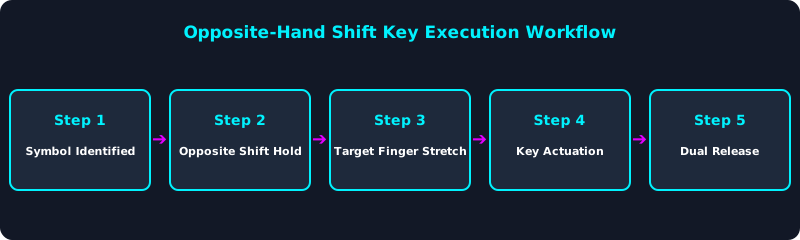
Using the opposite hand for Shift prevents hand twisting and ensures rapid, accurate symbol entry.
Overcoming the Number Row Speed Penalty
Because number keys are farther from home row, practice must focus on returning fingers immediately to home anchors after every number or symbol stroke.
5-Step Number & Symbol Touch-Typing Protocol
- Learn Opposite-Hand Shift Coordination: Always press Shift with the hand opposite the finger striking the symbol key.
- Practice 1-to-5 Left Hand Stretches: Train left pinky, ring, middle, and index extensions on TypeTestLab Structured Lessons.
- Practice 6-to-0 Right Hand Stretches: Train right index, middle, ring, and pinky number reaches.
- Perform Code & Syntax Drills: Type brackets, parentheses, and math operators via TypeTestLab Structured Lessons.
- Measure Technical Net WPM: Test your alphanumeric speed on TypeTestLab Speed Test.
Frequently Asked Questions (FAQ)
Why should I use opposite Shift keys?
Using the opposite hand to hold Shift keeps your striking hand relaxed and aligned for accurate reaches.
Is the top number row faster than a 10-key numpad?
For inline text and code, the top number row is faster; for continuous numeric data entry, a 10-key numpad is superior.
Which finger presses the 5 and 6 keys?
5 is struck by the left index finger; 6 is struck by the right index finger.
How can I type brackets {} [] without looking?
Brackets are assigned to the right pinky finger extending right of the P key.
Where can I find symbol typing drills?
Access technical symbol and syntax drills on TypeTestLab Structured Lessons.
Master Number & Symbol Touch Typing
Build fast symbol fluency for coding and data entry on TypeTestLab.
Start Symbol Drills ⚡