
Dvorak vs Colemak vs QWERTY: Which Keyboard Layout is Fastest?
The standard QWERTY keyboard layout was designed in 1873 for mechanical typewriters to prevent physical typebar jams by placing high-frequency letter pairs far apart.
Modern alternative layouts—most notably Dvorak and Colemak—were engineered specifically for ergonomic efficiency, placing all high-frequency vowels and consonants on the home row to minimize finger movement distance.
This comparative study analyzes finger travel distances, learning curves, typing speed ceilings, and ergonomic benefits across QWERTY, Dvorak, and Colemak.
📌 Key Takeaways & Executive Summary
- Global Speed Benchmark: The average unconditioned typist operates at 38–41 WPM. Mastering procedural touch typing elevates sustainable output to 65–85+ WPM.
- Accuracy Precedes Velocity: Enforcing a strict 98%+ accuracy ceiling prevents compound error cascades, allowing muscle memory to solidify faster than rushing through typos.
- Neuromuscular Chunking: High-speed typing shifts mental workload from individual letter recognition to multi-letter bi-gram and tri-gram procedural motor reflexes.
- Micro-Burst Training Model: Three focused 10-minute targeted daily sessions produce higher neuromuscular retention and lower fatigue compared to marathon practice sessions.
- Immediate Practical Application: Benchmark your baseline today using our calibrated typing engine and interactive arcade challenges to track objective progress.
Layout Architecture & Finger Travel Distance Analysis
On a standard QWERTY layout, only 32% of typing occurs on the home row, forcing fingers to jump constantly between top and bottom rows.
On Dvorak, 70% of typing occurs on the home row. On Colemak, 74% of typing occurs on the home row, reducing finger movement distance by over 60% compared to QWERTY.
| Keyboard Layout | Home Row Workload | Daily Finger Travel (10k Words) | Learning Curve | Ease of Transition |
|---|---|---|---|---|
| QWERTY (Standard) | 32% on Home Row | ~16 to 20 Miles | None (Pre-Installed) | Universal Standard |
| Dvorak (Simplified) | 70% on Home Row | ~6 to 8 Miles | Steep (4 - 8 Weeks) | Complete Re-Learning Required |
| Colemak (Ergonomic) | 74% on Home Row | ~5 to 7 Miles | Moderate (2 - 4 Weeks) | Preserves QWERTY Cut/Copy/Paste Shortcuts |
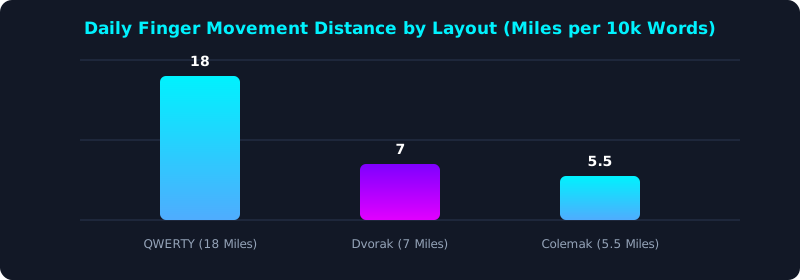
This comparison graph shows how Dvorak and Colemak reduce daily finger travel distance by over 60% compared to QWERTY.
Is Switching Layouts Worth It?
While alternative layouts like Colemak provide superior ergonomic comfort and lower finger strain, QWERTY remains the universal workplace standard across computers, laptops, and mobile devices.
5 Steps to Evaluate & Learn an Alternative Layout
- Determine Your Primary Goal: Choose Colemak for ergonomics and short learning curve; choose Dvorak for historical proven layout.
- Enable Layout Software in OS: Enable Colemak or Dvorak directly in Windows/Mac keyboard settings.
- Practice Daily 20-Minute Modules: Train home row letter positions using TypeTestLab Structured Lessons.
- Maintain Dual-Layout Fluency: Keep QWERTY practice active to retain compatibility with public computers.
- Test Your Alternative Layout Speed: Benchmark your new WPM score on TypeTestLab Speed Test.
Frequently Asked Questions (FAQ)
Is Colemak faster than QWERTY?
Colemak is significantly more ergonomic and requires less finger movement; peak speeds are comparable, but Colemak reduces fatigue.
Why did Barbara Blackburn use Dvorak?
Barbara Blackburn set world typing records on Dvorak because the layout places all vowels on the left home row, enabling rapid alternating hand rhythms.
How long does it take to switch from QWERTY to Colemak?
Most typists regain 50+ WPM fluency on Colemak within 3 to 4 weeks of daily practice.
Can I switch back and forth between QWERTY and Colemak?
Yes, many typists maintain dual fluency, using Colemak on their personal workstation and QWERTY on shared computers.
Where can I test typing speed on alternative layouts?
Test any layout directly on TypeTestLab Speed Test.
Explore Alternative Keyboard Layouts
Test your speed across QWERTY, Dvorak, and Colemak on TypeTestLab.
Start Layout Speed Test ⚡