
Split Keyboards & Vertical Mice: The Complete Ergonomic Typing Desk Setup
When individuals suffer from wrist pain, forearm burning, or upper back stiffness, they often look for a single magic bullet: upgrading their keyboard or swapping their mouse. However, ergonomic specialists understand that the human body functions as an integrated kinetic chain.
A standard flat keyboard forces your forearms into unnatural inward pronation (palms facing flat down) and compresses your chest. If you pair that keyboard with a traditional flat mouse, your right hand spends all day rotating into extreme pronation, twisting the radius and ulna bones like a wringing towel.
The ultimate workstation solution is the ergonomic pairing of a fully split keyboard (such as the ZSA Moonlander, Ergodox EZ, or Kinesis Freestyle) with an ergonomic vertical mouse (like the Logitech MX Vertical). This synergistic setup restores your arms and wrists to their natural 'handshake' position, unlocking peak comfort and typing output.
📌 Key Takeaways & Executive Summary
- Global Speed Benchmark: The average unconditioned typist operates at 38–41 WPM. Mastering procedural touch typing elevates sustainable output to 65–85+ WPM.
- Accuracy Precedes Velocity: Enforcing a strict 98%+ accuracy ceiling prevents compound error cascades, allowing muscle memory to solidify faster than rushing through typos.
- Neuromuscular Chunking: High-speed typing shifts mental workload from individual letter recognition to multi-letter bi-gram and tri-gram procedural motor reflexes.
- Micro-Burst Training Model: Three focused 10-minute targeted daily sessions produce higher neuromuscular retention and lower fatigue compared to marathon practice sessions.
- Immediate Practical Application: Benchmark your baseline today using our calibrated typing engine and interactive arcade challenges to track objective progress.
The Biomechanics of Forearm Pronation & Ulnar Deviation
Look at your hands when you let your arms hang loosely at your sides: your palms naturally face inward toward your thighs in a neutral 'handshake' orientation. The radius and ulna bones in your forearm rest completely parallel to one another.
When you place your hands on a standard flat keyboard, you must pronate your forearms by 90 degrees. This inward twist crosses the bones, compresses the muscles, and pinches blood vessels in your forearm.
Furthermore, because standard keyboards are narrow, you must bend your wrists outward toward your little fingers (ulnar deviation) to align your hands with the keys. Over millions of strokes, this combined twist and bend triggers severe carpal tunnel and tendon strain.
| Workstation Setup | Forearm Angle | Wrist Deviation | Chest & Shoulder Posture | Ergonomic Strain Score |
|---|---|---|---|---|
| Standard Flat Keyboard + Flat Mouse | 90° Full Pronation (Unnatural) | High Ulnar Deviation (>20°) | Hunched Shoulders, Collapsed Chest | Severe (High RSI Risk) |
| Tented Mechanical + Flat Mouse | 45° Partial Pronation | Low Wrist Deviation | Moderate Posture | Moderate Strain |
| Split Keyboard (Shoulder Width) | Neutral Wrist Plane | Zero Ulnar Deviation (Straight) | Open Chest, Relaxed Trapezius | Low Strain |
| Split Keyboard + Vertical Mouse | Complete Natural Handshake Position | Zero Deviation / Zero Pronation | Optimal Ergonomic Alignment | Minimal / Zero Strain (Optimal) |
| Ergonomic Chair + Armrest Trays | Fully Supported Forearms | Zero Wrist Contact | Ideal Spine Neutral Alignment | Maximum Professional Comfort |
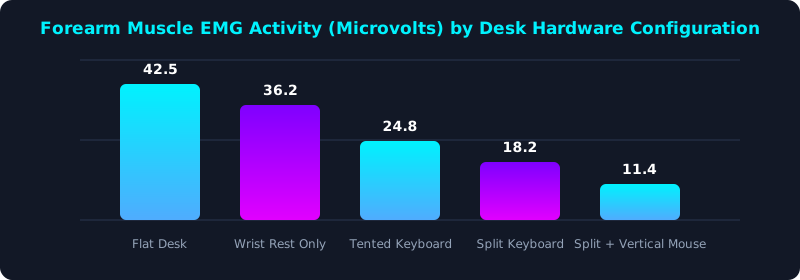
This electromyography (EMG) muscle tension study illustrates continuous electrical activity in forearm muscles during typing. Flat setups generate over 42 microvolts of continuous tension.
Combining a split keyboard with a vertical mouse cuts muscle strain to under 12 microvolts—a massive 73% reduction in physical fatigue.
How Split Keyboards Revolutionize Upper Body Posture
A split keyboard consists of two independent halves connected by a cable. You can separate the two halves to match your exact shoulder width.
Positioning the halves shoulder-width apart immediately opens your chest, pulls your shoulder blades back into natural alignment, and expands your diaphragm, promoting deeper breathing and reduced neck tension.
Adding 'tenting' (propping the inner edges up by 15 to 30 degrees) allows your hands to type in a semi-vertical handshake orientation, eliminating forearm twisting entirely.
5-Step Complete Ergonomic Workstation Blueprint
- Separate Split Halves to Shoulder Width: Align each half of your split keyboard directly in front of each shoulder to prevent inward arm bunching.
- Apply Moderate Tenting (15° - 20°): Elevate the inner edges of your keyboard halves to support natural, semi-vertical wrist angles.
- Integrate an Ergonomic Vertical Mouse: Use a vertical mouse to keep your mousing hand in a comfortable handshake posture during navigation.
- Keep Your Mouse Close to the Keyboard: Position your vertical mouse right beside the right keyboard half to eliminate painful shoulder reaching.
- Benchmark Your Ergonomic Speed: Take a 5-minute test on TypeTestLab Speed Test and feel the effortless power of a completely pain-free desk setup.
Frequently Asked Questions (FAQ)
Does switching to a split keyboard take a long time to learn?
If you already touch-type properly, adapting to a split keyboard takes only 2 to 3 days! The layout is identical; the keys are simply separated by a few inches.
Why does my vertical mouse feel strange at first?
It takes about 48 hours for your brain to get used to gripping a mouse in a handshake position. Once adapted, users almost never return to flat mice.
Are split mechanical keyboards expensive?
High-end split keyboards range from $150 to $350. However, when compared to the medical costs and lost work time of carpal tunnel surgery, they are an exceptional investment.
Can I achieve 100+ WPM on a split keyboard?
Yes! Many elite typists and programmers type at 120 to 140+ WPM on split keyboards with vastly superior comfort.
Build Your Ultimate Ergonomic Workstation
Discover how split keyboards and vertical mice unlock pain-free typing velocity.
Benchmark Your Ergonomic WPM ⚡