
Touch Typing for Kids & Beginners: Step-by-Step Educational Roadmap
In an increasingly digital world, teaching children how to touch-type at an early age provides a lifelong academic and creative advantage.
Children who master 10-finger touch typing write essays faster, experience less frustration during online homework, and build digital confidence.
This educational guide presents a step-by-step roadmap for parents, teachers, and beginners to learn touch typing through fun, gamified lessons.
📌 Key Takeaways & Executive Summary
- Global Speed Benchmark: The average unconditioned typist operates at 38–41 WPM. Mastering procedural touch typing elevates sustainable output to 65–85+ WPM.
- Accuracy Precedes Velocity: Enforcing a strict 98%+ accuracy ceiling prevents compound error cascades, allowing muscle memory to solidify faster than rushing through typos.
- Neuromuscular Chunking: High-speed typing shifts mental workload from individual letter recognition to multi-letter bi-gram and tri-gram procedural motor reflexes.
- Micro-Burst Training Model: Three focused 10-minute targeted daily sessions produce higher neuromuscular retention and lower fatigue compared to marathon practice sessions.
- Immediate Practical Application: Benchmark your baseline today using our calibrated typing engine and interactive arcade challenges to track objective progress.
Age-Appropriate Milestones for Young Typists
Children as young as 7 or 8 possess the hand size and motor coordination to begin basic home row touch typing.
Setting realistic WPM targets based on age prevents frustration while encouraging steady growth.
| Age Group | Target WPM Goal | Recommended Practice Time | Primary Focus Area |
|---|---|---|---|
| Ages 7 - 9 (Elementary) | 15 - 25 WPM | 10 Mins / Day | Home Row Anchoring & Visual Fast |
| Ages 10 - 12 (Middle School) | 30 - 45 WPM | 15 Mins / Day | Top/Bottom Row Extensions & Accuracy |
| Ages 13+ (High School) | 50+ WPM | 15 Mins / Day | Prose Speed & Timed Exam Prep |
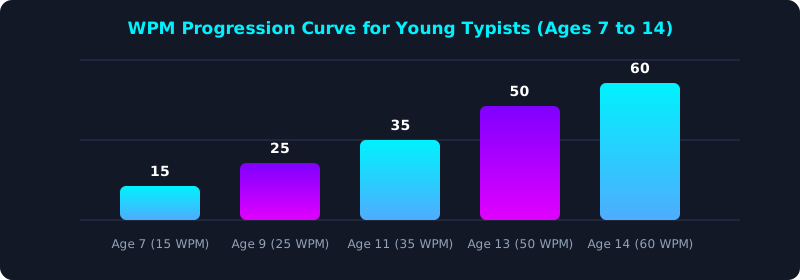
This progress chart shows how early touch-typing education leads to high speed by high school.
Gamified Learning & Reward Systems
Integrating interactive games, animated finger guides, and printable achievement certificates keeps young learners motivated and engaged.
5 Steps to Teach Kids Touch Typing at Home
- Start with Home Row Finger Anchors: Introduce F and J key bumps using interactive games on Typing Games Engine.
- Enforce No Looking at Hands: Cover hands with a light cloth to build blind spatial memory.
- Keep Lessons Short (10-15 Mins): Use brief daily micro-sessions to maintain focus and fun.
- Play Interactive Typing Games: Build speed through fun arcade challenges on Typing Games Engine.
- Reward Progress with Certificates: Print official achievement badges from Official Typing Certificate.
Frequently Asked Questions (FAQ)
What age should a child start learning to type?
Children can begin learning touch typing at age 7 or 8 once their hands comfortably reach standard keycaps.
How can I keep my child motivated to practice typing?
Use gamified typing games, short 10-minute sessions, and printable progress certificates.
Is touch typing hard for beginners?
With structured home row lessons, beginners achieve basic touch-typing fluency in 2 to 3 weeks.
Can kids use adult keyboards?
Yes, standard keyboards work well for children aged 8+; compact keyboards are also great for smaller hands.
Where can kids practice typing for free?
Kids can access free fun typing games on Typing Games Engine.
Start Fun Beginner Typing Today
Explore interactive typing games and lessons for kids on TypeTestLab.
Play Free Typing Games ⚡