
Preventing Bottoming Out: How Tactile Feedback Saves Your Finger Joints
When typists transition from cheap membrane office keyboards to mechanical keyboards, one of the most transformative concepts they encounter is the mechanical 'actuation point'. Unlike membrane keyboards—which must be pressed completely flat against the baseplate to register—mechanical switches register electricity halfway through their travel.
Yet, due to years of ingrained typing habits, the vast majority of typists continue to 'bottom out'—smashing every single key with maximum force until the plastic stem forcefully collides with the switch housing and metal plate.
Bottoming out thousands of times every hour sends repetitive shockwaves through the phalanges and metacarpal joints of your hands, causing joint inflammation, cartilage wear, and rapid muscle fatigue. Mastering tactile feedback allows you to float across keys with light, pain-free precision.
📌 Key Takeaways & Executive Summary
- Global Speed Benchmark: The average unconditioned typist operates at 38–41 WPM. Mastering procedural touch typing elevates sustainable output to 65–85+ WPM.
- Accuracy Precedes Velocity: Enforcing a strict 98%+ accuracy ceiling prevents compound error cascades, allowing muscle memory to solidify faster than rushing through typos.
- Neuromuscular Chunking: High-speed typing shifts mental workload from individual letter recognition to multi-letter bi-gram and tri-gram procedural motor reflexes.
- Micro-Burst Training Model: Three focused 10-minute targeted daily sessions produce higher neuromuscular retention and lower fatigue compared to marathon practice sessions.
- Immediate Practical Application: Benchmark your baseline today using our calibrated typing engine and interactive arcade challenges to track objective progress.
The Physics of Deceleration & Joint Impact Forces
When a finger strikes a key, it possesses kinetic energy. In a proper mechanical stroke, the finger presses down past the actuation point (typically 2.0mm) and decelerates naturally against the internal switch spring, reversing direction before slamming into the bottom baseplate.
When a typist bottoms out with aggressive force (often exerting 150 to 200 grams of force on a 50g switch), deceleration occurs instantaneously against an unyielding rigid steel or aluminum plate. The finger bone absorbs the entire kinetic shock wave.
Over an 8-hour workday of 60,000 keystrokes, this cumulative impact is equivalent to hammering your fingertips into a stone countertop thousands of times. This constant blunt impact is a primary contributor to chronic finger osteoarthrosis.
| Keystroke Style | Average Force Applied | Baseplate Collision | Joint Shock Absorption | Fatigue Onset |
|---|---|---|---|---|
| Aggressive Bottom-Out | 180 - 250 grams | Hard, Violent Impact | 100% Absorbed by Knuckle Joints | Pain within 45 Minutes |
| Standard Bottom-Out | 90 - 120 grams | Moderate Solid Impact | Moderate Joint Shock | Fatigue after 2 Hours |
| Dampened Bottom-Out (O-Rings) | 80 - 100 grams | Soft Rubber Cushion | Low (Cushioned Collision) | Comfortable for 4 Hours |
| Pure Floating Actuation | 50 - 65 grams | Zero Baseplate Contact | Zero Joint Impact (Spring Cushioned) | Fatigue-Free Across 8 Hours |
| Heavy Spring Float (67g-78g) | 65 - 75 grams | Zero Contact (Spring Rebound) | Zero Joint Impact | Fatigue-Free High Accuracy |
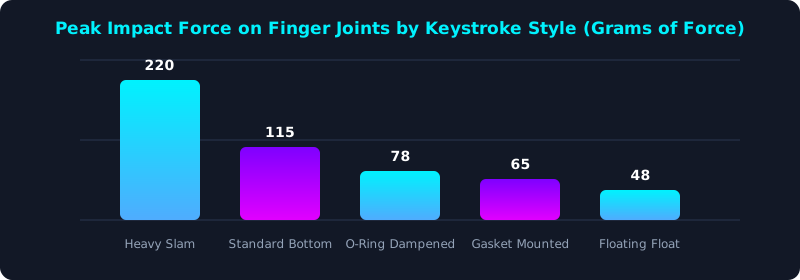
This mechanical sensor test illustrates the peak impact force transferred to finger knuckle joints across typing styles. Aggressive bottoming out generates over 200 grams of destructive shock.
Floating actuation reduces impact to under 50 grams, completely shielding finger joints from injury.
Using Tactile Bumps as Physical Actuation Signals
Tactile switches (such as Gazzew Boba U4T, Cherry MX Brown, or Holy Panda) feature a pronounced physical bump right at the electrical actuation point.
This tactile bump serves as an immediate physical signal to your nervous system: the moment your finger feels the bump collapse, the keystroke has registered! You do not need to push any further.
Learning to release the key immediately upon feeling the tactile bump trains your hands to 'hover' on the actuation plane, producing whisper-quiet keystrokes and effortless speed.
5-Step Joint Protection & Floating Keystroke Blueprint
- Equip Tactile Mechanical Switches: Choose switches with a defined tactile bump to give your fingertips clear physical feedback when the key registers.
- Install Silicone Dampening O-Rings: Place small silicone rings on keycap stems to provide a soft rubber landing if you accidentally bottom out.
- Practice the 'Feather-Touch' Drill: Type slowly at 30 WPM, focusing on pressing keys just enough to feel the bump without making any bottom-out noise.
- Choose Heavier Springs (62g - 67g): Slightly heavier progressive springs naturally push back against your fingers, preventing you from crashing into the plate.
- Benchmark Your Silent Floating Speed: Take a test on TypeTestLab Speed Test and observe how gentle, floating strokes deliver sustainable high-speed comfort.
Frequently Asked Questions (FAQ)
Is it bad to bottom out on a mechanical keyboard?
Bottoming out is not inherently harmful if done with a gentle touch. However, aggressive, heavy bottoming out causes chronic joint inflammation and finger fatigue.
Do O-rings make mechanical keyboards mushy?
O-rings soften the hard plastic collision at the bottom of the stroke. Some typists find them slightly softer, but they provide excellent joint protection.
Which switches are easiest to type on without bottoming out?
Tactile switches with medium-weight springs (62g to 68g) provide the best physical resistance to stop your fingers right after actuation.
How long does it take to learn not to bottom out?
It typically takes 2 to 3 weeks of mindful daily practice to retrain muscle memory to release keys at the actuation point.
Save Your Finger Joints Today
Master floating touch mechanics and type pain-free for decades.
Practice Floating Touch Test ⚡