
Ergonomic Split & Ortholinear Keyboards: Pros, Cons & Learning Curve
Traditional staggered keyboards force your wrists to pronate inward and twist outward (ulnar deviation) to align with staggered key columns.
Ergonomic split keyboards (e.g., Ergodox, ZSA Moonlander, Glove80) separate the keyboard into two independent halves, allowing your shoulders and wrists to align naturally.
Ortholinear keyboards arrange keys in straight vertical columns rather than staggered rows, eliminating diagonal finger reaches.
This guide examines split and ortholinear keyboard designs, ergonomic health benefits, pros and cons, and adjustment strategies.
📌 Key Takeaways & Executive Summary
- Global Speed Benchmark: The average unconditioned typist operates at 38–41 WPM. Mastering procedural touch typing elevates sustainable output to 65–85+ WPM.
- Accuracy Precedes Velocity: Enforcing a strict 98%+ accuracy ceiling prevents compound error cascades, allowing muscle memory to solidify faster than rushing through typos.
- Neuromuscular Chunking: High-speed typing shifts mental workload from individual letter recognition to multi-letter bi-gram and tri-gram procedural motor reflexes.
- Micro-Burst Training Model: Three focused 10-minute targeted daily sessions produce higher neuromuscular retention and lower fatigue compared to marathon practice sessions.
- Immediate Practical Application: Benchmark your baseline today using our calibrated typing engine and interactive arcade challenges to track objective progress.
Staggered vs Ortholinear Grid vs Split Architecture
Standard keyboards use staggered key columns inherited from 19th-century mechanical typewriter lever linkages.
Ortholinear grid keyboards align keys in straight vertical columns matching natural finger flexion. Split ergonomic keyboards separate left and right hand clusters entirely, allowing custom shoulder-width placement.
| Keyboard Category | Key Column Layout | Wrist Position | Ergonomic Strain Risk | Adjustment Period |
|---|---|---|---|---|
| Standard Staggered | Diagonal Staggered Rows | Inward Pronation & Ulnar Twist | High (RSI & Wrist Strain) | None (Default Standard) |
| Fixed Ergonomic (e.g. MS Sculpt) | Fixed Split Angle | Semi-Neutral Wrist Angle | Moderate Relief | 1 - 3 Days |
| Fully Split Mechanical (Ergodox) | Separated Dual Modules | 100% Neutral Shoulder Width | Extremely Low Strain | 1 - 2 Weeks |
| Ortholinear Split (Moonlander) | Straight Vertical Grid | Neutral Grid + Column Alignment | Minimal Joint Strain | 2 - 3 Weeks |
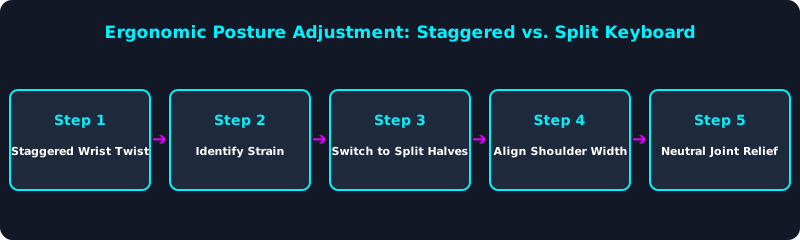
This posture diagram illustrates how split keyboards eliminate ulnar deviation by opening shoulder alignment.
Programmable Thumb Clusters & Layer Mapping
Split ergonomic keyboards feature programmable thumb clusters. Instead of using weak pinky fingers for Space, Backspace, Enter, Delete, and Layer toggles, thumbs handle high-frequency utility keys.
5 Steps to Transition to a Split Ergonomic Keyboard
- Set Shoulder-Width Module Distance: Position split halves directly in line with your shoulders.
- Adjust Tenting Angle: Elevate the inner edge of each module to maintain a neutral handshake wrist posture.
- Program Custom Thumb Layers: Assign Space, Enter, Backspace, and Tab to thumb cluster keys.
- Practice Touch-Typing Grid Drills: Retrain finger extensions on TypeTestLab Structured Lessons.
- Test Your Split Keyboard Net WPM: Benchmark your new ergonomic WPM score on TypeTestLab Speed Test.
Frequently Asked Questions (FAQ)
Are split keyboards worth the cost?
Yes! For programmers and heavy typists experiencing wrist or shoulder strain, split keyboards offer tremendous ergonomic relief.
What is an ortholinear keyboard?
An ortholinear keyboard arranges keys in straight vertical columns rather than traditional diagonal staggered rows.
How long does it take to get used to a split keyboard?
Most typists adapt to a split keyboard within 3 to 7 days, reaching full speed on ortholinear grids within 2 to 3 weeks.
Do thumb clusters improve typing speed?
Yes, moving heavy utility keys (Backspace, Enter, Delete) to strong thumbs reduces pinky strain and speeds up editing.
Where can I practice typing on a split keyboard?
Train your touch-typing mechanics directly on TypeTestLab Structured Lessons.
Optimize Your Typing Ergonomics
Test your speed and practice touch typing on TypeTestLab.
Start Free Ergonomic Test ⚡