

Elementary & Middle School Typing Benchmarks: Grade-by-Grade WPM Guide
As school districts across North America, the United Kingdom, and Australia integrate 1-to-1 Chromebook initiatives, digital state testing, and online learning platforms into primary education, keyboarding has become an indispensable foundational literacy skill.
Decades of educational research confirm that children who master touch typing in late elementary school outperform peers on computerized writing assessments, demonstrate better focus during digital homework assignments, and exhibit significantly lower levels of physical eye and wrist fatigue.
This grade-by-grade benchmark report outlines realistic Words Per Minute (WPM) targets from Kindergarten through Grade 8, providing teachers, school administrators, and parents with empirical data to evaluate student keyboarding readiness.
📌 Key Takeaways & Executive Summary
- Global Speed Benchmark: The average unconditioned typist operates at 38–41 WPM. Mastering procedural touch typing elevates sustainable output to 65–85+ WPM.
- Accuracy Precedes Velocity: Enforcing a strict 98%+ accuracy ceiling prevents compound error cascades, allowing muscle memory to solidify faster than rushing through typos.
- Neuromuscular Chunking: High-speed typing shifts mental workload from individual letter recognition to multi-letter bi-gram and tri-gram procedural motor reflexes.
- Micro-Burst Training Model: Three focused 10-minute targeted daily sessions produce higher neuromuscular retention and lower fatigue compared to marathon practice sessions.
- Immediate Practical Application: Benchmark your baseline today using our calibrated typing engine and interactive arcade challenges to track objective progress.
Developmental Motor Milestones & Keyboarding Readiness
Children develop fine motor coordination progressively. In early elementary grades (Kindergarten through Grade 2), small hand sizes and developing finger independence make strict 10-finger touch typing challenging. At this stage, keyboard education focuses on keyboard layout familiarization, spacebar thumb usage, and proper upright posture.
By Grade 3 (ages 8–9), children possess the neuromuscular maturity required for formal home row anchoring. Introducing structured touch-typing lessons during Grade 3 prevents bad habits—such as two-finger hunt-and-peck techniques—from taking permanent root.
By middle school (Grades 6–8), students are regularly tasked with research essays, laboratory reports, and digital state testing. Achieving 35 to 45 WPM ensures that technology acts as a bridge for expression rather than an academic roadblock.
| Grade Level | Typical Age | Target Speed (WPM) | Target Accuracy | Curriculum Focus Area |
|---|---|---|---|---|
| Kindergarten - Grade 1 | 5 - 7 Years | 5 - 10 WPM | 85% | Letter Recognition & Spacebar |
| Grade 2 | 7 - 8 Years | 10 - 15 WPM | 88% | Two-Hand Awareness & Posture |
| Grade 3 | 8 - 9 Years | 15 - 20 WPM | 90% | Home Row Keys (ASDF JKL;) |
| Grade 4 | 9 - 10 Years | 20 - 25 WPM | 92% | Top Row Reaches & Shift Key |
| Grade 5 | 10 - 11 Years | 25 - 30 WPM | 94% | Bottom Row Reaches & Numbers |
| Grade 6 - 8 (Middle School) | 11 - 14 Years | 35 - 45 WPM | 96% | Full Keyboard Mastery & Speed |
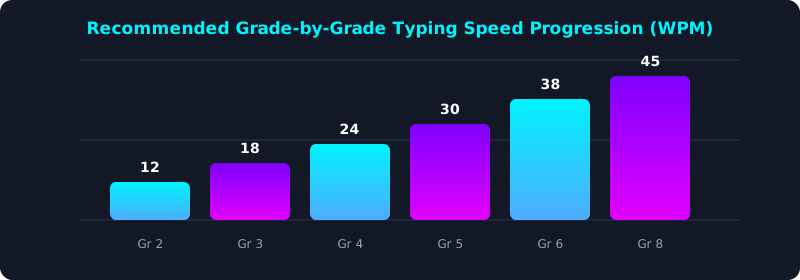
This progression chart outlines the recommended Words Per Minute milestones from 2nd Grade through 8th Grade. Notice the steady, manageable 5 to 7 WPM annual progression.
Establishing this baseline ensures students enter high school with 45+ WPM proficiency, completely prepared for digital SATs, AP exams, and collegiate writing assignments.
Pedagogical Strategies for Keeping Young Learners Engaged
Traditional repetitive typing drills can quickly lead to disengagement among young students. Modern educational pedagogy combines gamification with structured mechanics to sustain motivation.
Interactive arcade typing challenges—such as popping word bubbles, slicing falling fruit keywords, or dodging racing obstacles—turn neuromuscular repetition into an enjoyable classroom activity. Games incentivize accuracy by penalizing miskeys with game-over consequences.
Teachers should emphasize accuracy over raw speed during early stages. Reassure students that speed naturally follows once neural pathways for key positions are securely established.
5-Step Implementation Blueprint for Classroom Keyboarding
- Set Up Ergonomic Workstations: Ensure chair height allows student feet to rest flat and forearms remain parallel to desk surfaces.
- Introduce the Tactile Bumps: Teach students to locate the F and J index finger homing ridges without looking down at the keyboard.
- Incorporate Arcade Challenges: Use Typing Games Engine to provide lively, engaging reinforcement after structured lesson drills.
- Enforce The No-Peeking Rule: Use keyboard covers or encourage students to focus their eyes strictly on the screen.
- Celebrate Milestones: Reward student achievement with downloadable Official Typing Certificate awards at every 10 WPM threshold.
Frequently Asked Questions (FAQ)
At what age should a child start learning to type?
Children can begin basic keyboard familiarity around age 6 or 7, but formal 10-finger touch typing training is most effective starting in 3rd grade (ages 8 to 9).
What is the general formula for school typing speed benchmarks?
A widely accepted pedagogical guideline is the 'Grade Level × 5' rule: Multiply the student's grade level by 5 to find their target WPM (e.g., 4th Grade × 5 = 20 WPM; 6th Grade × 5 = 30 WPM).
Why do kids struggle with laptops compared to desktop keyboards?
Laptops have compact key spacing that can cause hand cramping in young students. Using an external keyboard with standard dimensions supports better posture and finger placement.
How much typing practice do elementary students need each week?
Two to three 15-minute practice sessions per week are optimal for steady skill acquisition without causing cognitive overload or physical strain.
Inspire Your Students to Type Faster
Explore interactive typing lessons and gamified challenges built for modern young learners.
Explore Student Typing Lessons ⚡