
Best Mechanical Keyboards & Switches for Typing Speed
Upgrading from a cheap membrane laptop keyboard to a high-quality mechanical keyboard is one of the most effective hardware investments you can make to increase typing speed and comfort.
Mechanical switches offer precise tactile feedback, customizable actuation forces, and superior durability. However, with hundreds of switch options available (linear, tactile, clicky), choosing the right keyboard for typing efficiency can be overwhelming.
This buyer's guide evaluates top mechanical keyboards and switches specifically optimized for typing speed, low finger fatigue, and office acoustics.
📌 Key Takeaways & Executive Summary
- Global Speed Benchmark: The average unconditioned typist operates at 38–41 WPM. Mastering procedural touch typing elevates sustainable output to 65–85+ WPM.
- Accuracy Precedes Velocity: Enforcing a strict 98%+ accuracy ceiling prevents compound error cascades, allowing muscle memory to solidify faster than rushing through typos.
- Neuromuscular Chunking: High-speed typing shifts mental workload from individual letter recognition to multi-letter bi-gram and tri-gram procedural motor reflexes.
- Micro-Burst Training Model: Three focused 10-minute targeted daily sessions produce higher neuromuscular retention and lower fatigue compared to marathon practice sessions.
- Immediate Practical Application: Benchmark your baseline today using our calibrated typing engine and interactive arcade challenges to track objective progress.
Mechanical vs. Membrane Keyboard Performance
Membrane keyboards require bottoming out keycaps completely against a rubber dome, requiring 60 to 70 grams of force and causing finger joint fatigue.
Mechanical switches actuate mid-stroke at 40 to 50 grams of force, allowing fingers to glide effortlessly without bottoming out.
| Keyboard Model | Switch Options | Form Factor | Key Feature for Typists | Ideal Workflow |
|---|---|---|---|---|
| Keychron Q1 Max | Gateron Jupiter Brown / Red | 75% Compact | Full Aluminum, Gasket Mount, Wireless | Programmers & Office Pros |
| Logitech MX Mechanical | Kailh Choc Low Profile | Full-Size / Mini | Low Profile Keycaps, Multi-Device | Executive Assistants & Office |
| NuPhy Air75 V2 | Gateron Low Profile Red/Brown | 75% Low Profile | Ultra-Slim Design, Mac & Win | Remote Workers & Travel |
| ZSA Moonlander Mark I | Kailh Box Brown / Silent Red | Split Ergonomic | Ortholinear Split, Thumb Clusters | Heavy Typists & Programmers |
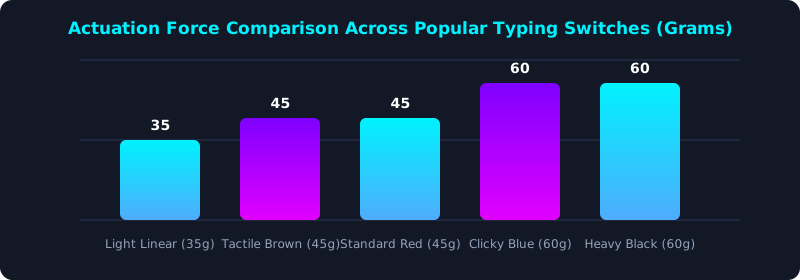
This graph compares switch actuation forces, showing why 40-50g switches offer the ideal balance for typing speed.
Gasket Mounting & Sound Dampening for Office Acoustics
Gasket-mounted mechanical keyboards integrate silicone isolators between the plate and case, absorbing impact vibration and producing a quiet, cushioned keystroke.
5 Steps to Choose Your Ideal Typing Keyboard
- Select Preferred Switch Type: Choose light tactile (Brown) or linear (Red) switches for typing speed and low noise.
- Choose Desired Keycap Profile: Opt for Cherry or OEM profiles for comfortable finger reaches.
- Determine Workspace Form Factor: Select TKL or 75% to optimize desk space and shoulder ergonomics.
- Test Keyboard Rollover & Latency: Verify your keyboard's NKRO performance using TypeTestLab Structured Lessons.
- Benchmark Speed Improvement: Measure your Net WPM gain on TypeTestLab Speed Test.
Frequently Asked Questions (FAQ)
Are mechanical keyboards better for typing speed?
Yes, mechanical switches actuate mid-stroke with less force, reducing finger fatigue and boosting speed by 5% to 10%.
Are mechanical keyboards too loud for an office?
Not if you choose silent linear or tactile switches (e.g., Boba U4, Cherry MX Silent Red).
What is the best switch for fast typing?
Light tactile switches (45g actuation force) are widely considered ideal for touch typing.
What is a gasket-mounted keyboard?
Gasket mounting uses flexible silicone cushions to absorb keystroke shock, producing a softer typing feel.
Where can I test my speed on a new keyboard?
Take a benchmark test on TypeTestLab Speed Test.
Test Your Keyboard Performance Today
Benchmark your speed across different keyboards on TypeTestLab.
Start Free Keyboard Test ⚡